
Last updated: Oct 2026
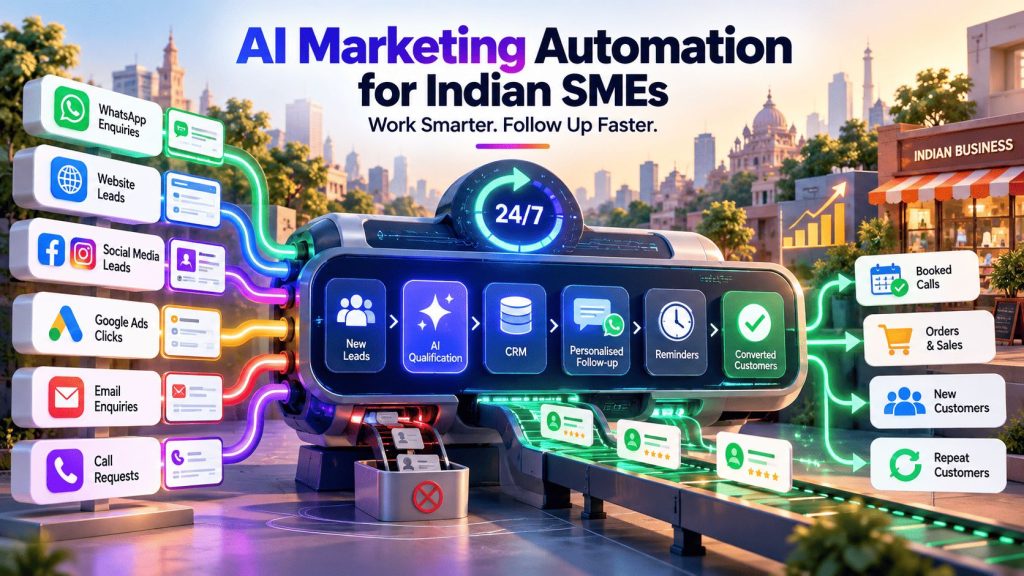
Most small businesses in India don’t need a “marketing automation strategy.” They need to stop losing leads because nobody answered a WhatsApp message for two days, and they need to stop sending the same Diwali offer to every name on the list.
That is the real job of marketing automation: handling the repetitive, time-sensitive follow-up that a busy owner or a small team keeps meaning to get to. AI is what has made it affordable and approachable enough that a ten-person company in Indore or Indiranagar can use it without hiring a specialist.
This guide is for owners and marketing leads who want the practical version. We cover what marketing automation actually is, which jobs are worth automating first, how a CRM fits in, how to choose software without overspending, where AI genuinely helps (and where it doesn’t), what India’s new data protection rules mean for you, and a 90-day plan to get started. Where we don’t have solid numbers, we say so rather than inventing them.
What is marketing automation, and what does AI add?
Marketing automation is software that carries out routine marketing tasks for you, based on rules you set or on what a customer does. Send a welcome email when someone signs up. Remind a customer about the item they left in their cart. Pass a lead to your sales team once they’ve opened three emails. Nobody has to remember to do any of it.
A CRM (customer relationship management system) is where your contact details and history live: who enquired, from where, what they were told, what happens next. The automation tool acts on that information. Many platforms now bundle the two, which is why you’ll see “CRM and marketing automation” sold as one product.
AI adds two things on top of the rules:
- Judgement. The software can make some decisions for you, such as the best time to send a message, which leads look most likely to buy, or which version of a subject line is working.
- Language. It can draft replies, emails, product descriptions and ad variations in seconds, including in Hindi and other Indian languages.
A useful way to hold the two ideas apart: automation is “if this happens, do that.” AI is “figure out what to say, or who to say it to.” The most useful setups combine both, and keep a person in charge of anything a customer will read.
Which marketing jobs are worth automating first
A simple test: if someone on your team does the same task the same way many times a week, and it causes damage when it's late, automate it. These are the usual starting points for Indian small businesses.
Lead follow-up.
Enquiries arrive from your website, Meta lead forms, Google Ads, Instagram DMs and enquiry portals, and the first business to reply usually wins. An automatic acknowledgement within a minute, followed by a task reminding a human to call, fixes the most common leak in small-business marketing.
Welcome and onboarding messages.
A new customer or enquirer gets a short, useful sequence: who you are, what happens next, answers to the three questions everyone asks.
Appointment and payment reminders.
Salons, clinics, coaching institutes and service businesses lose real money to no-shows and late payments. A reminder on WhatsApp, with a payment link where relevant, costs almost nothing to send.
Abandoned cart and repeat-purchase nudges.
For online stores, a gentle reminder about a cart left behind, or a "time to reorder" message for consumables, is often the highest-return automation available. If you run a store, see how this fits with ecommerce marketing.
Review requests.
A message sent a day after a purchase or visit, asking for a Google review, builds the review count that local search rewards. It pairs naturally with Google Business Profile optimisation.
Festival and seasonal campaigns.
Schedule them early and segment by what people have bought, so a returning customer doesn't get the same message as a new enquirer.
Reporting.
A weekly summary of leads, ad spend and follow-ups pulled into one place saves the Monday-morning spreadsheet scramble and shows you which channels actually work.
Three illustrative scenarios
These are examples of how the pieces fit together, not client results.
A coaching institute.
A parent fills in an enquiry form from an Instagram ad. The CRM logs the lead, a WhatsApp message with the brochure goes out straight away, and the counsellor gets a task to call within the hour. If the call hasn't been logged by evening, the manager gets a nudge. After a demo class, a follow-up message goes out the next morning.
A local clinic or salon.
A booking triggers a confirmation, a reminder the day before, and a short thank-you with a review link afterwards. Customers who haven't returned in a few months get a polite check-in.
A D2C brand selling consumables.
Abandoned carts get a reminder. Customers who bought a 30-day product get a reorder prompt around day 25. Festival offers go to segments, not to the whole list.
Start with the CRM, not the tool
Automation is only as good as the customer information behind it. If your leads live in one spreadsheet, your WhatsApp chats in a phone, and your email list in a third tool, nothing can be triggered automatically, because nothing knows what anything else knows.
For most small businesses the sensible order is:
✅ Choose a CRM your team will genuinely open every day. If they won’t use it, nothing built on top will work.
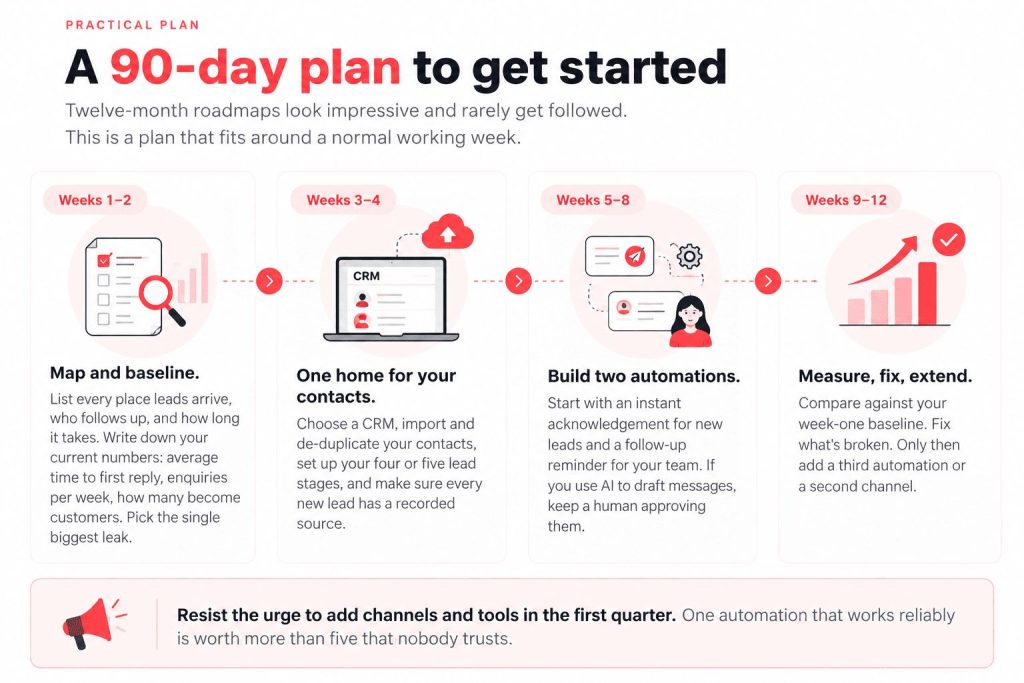
✅ Decide on four or five simple stages a lead moves through, such as New, Contacted, Interested, Quoted, Won or Lost.
✅ Record the source of every lead (which ad, which form, which referral). This is what later tells you where to spend.
✅ Only then add automation: instant replies, follow-up reminders, nurture messages.
Buying an advanced automation platform before your contacts are in one place is the most common reason these projects stall. A free or low-cost CRM with two good automations will beat an expensive platform with fifty half-built ones.
Choosing marketing automation software
There is no single best marketing automation software for every business, and anyone who tells you otherwise is probably selling one. A better approach is to answer five questions first:
- Where do your customers actually talk to you: WhatsApp, email, phone, or all three?
- Do you have a sales team that follows up, or is it mostly the owner?
- How many contacts do you have today, and how fast is the list growing?
- Who will run the tool week to week?
- What do you already use (Google Workspace, Zoho, Shopify, a billing tool) that this must connect to?
Here is how the common options line up. Prices and plan limits change often, so check each vendor’s own pricing page before you decide, and look at whether prices are shown in rupees or dollars, whether GST is added on top, and what happens to the cost when your contact list doubles.
| Tool | Best for | Worth knowing |
|---|---|---|
| HubSpot | Marketing-led teams that want CRM, email and automation in one place | A free CRM is available; paid marketing plans can climb quickly, so check the numbers carefully |
| Zoho (CRM + Campaigns) | Indian SMEs wanting local billing and a low entry cost | Email automation sits in a separate product from the CRM; there is a free CRM plan for very small teams; confirm current WhatsApp options before buying |
| Brevo | Small lists and tight budgets | Has a free plan; also offers SMS and WhatsApp messaging; check current limits |
| WebEngage / MoEngage | Consumer brands with a large customer base | Indian platforms built for multi-channel messaging; WebEngage is custom-priced |
| Mautic | Technical teams | Free and self-hosted, but someone must set it up and maintain it |
| Mailchimp | A simple, email-first start | Easy to begin with, but the price can rise as your list grows |
A few practical rules of thumb:
👉 If you want one tool for everything and have a sales team, look first at HubSpot or Zoho.
👉 If you’re email-led and watching every rupee, start with a free plan from Brevo or similar and upgrade only when you hit a real limit.
👉If you’re a consumer brand with a big customer base and a technical team, the Indian multi-channel platforms are worth a demo.
👉 Whatever you pick, run a real two-week trial with your own data before paying for a year.
Where AI actually helps (and where it doesn’t)
Drafting and language. Writing a first version of a reply, an email, a product description or ten ad variations is where AI saves the most time right now. It can draft in Hindi and other Indian languages, but always have a native speaker read customer-facing text before it goes out, because tone and idiom are easy to get slightly wrong. On WhatsApp, message templates also have to be approved per language.
Timing and scoring. Many platforms now offer send-time optimisation and lead scoring. These work best when there is enough data to learn from. With a list of a few hundred contacts, the AI has very little to go on, so treat these features as a bonus rather than a reason to buy.
Chat assistants. A bot on your website or WhatsApp can answer routine questions (opening hours, pricing basics, order status) and hand over to a person when it can’t. Be upfront that it is an assistant, and make the route to a human easy to find.
Claude, ChatGPT and Gemini inside your workflows. On their own, AI assistants just answer questions. Connected to a no-code workflow tool such as n8n, Make or Zapier, they can run a sequence for you. For example: a new enquiry arrives, the AI drafts a reply using your price list and tone notes, you approve it with one tap, and it goes out on WhatsApp or email. Keep that human approval step for anything customer-facing until you’ve watched it work for several weeks. If you’d like to build something like this yourself, our no-code AI marketing agent guide walks through it, and our comparison of AI tools for digital marketing will help you choose between the assistants.
🤔 Where AI doesn’t help. It can’t fix a weak offer, an unclear price, or a messy contact list. It won’t know your brand voice unless you describe it. And it can’t decide your strategy. Automation makes whatever you’re already doing faster, which is excellent if the process is sound and expensive if it isn’t.
WhatsApp and email: the two channels most Indian SMEs start with
WhatsApp. It’s where Indian customers prefer to talk, so it’s often the first channel worth automating. Two things to know. First, WhatsApp’s own business policies require people to have opted in before you message them, so collect that permission clearly at the point of enquiry. Second, messaging through the WhatsApp Business API is charged by Meta (via your provider) and the rates and categories change, so check the current rate card before you plan volumes. Many small businesses get surprisingly far with the free WhatsApp Business app’s quick replies, labels and away messages before moving to the API. For a full walkthrough, read our WhatsApp Business automation guide for Indian SMEs.
Email. It is still the cheapest way to bring customers back. A short welcome series, a post-purchase follow-up, and festival offers segmented by past purchases cover most of what a small business needs. Keep the list clean (remove bounces and people who never open) and always include a working unsubscribe link.
What does it cost?
The honest answer is that software is often the smallest part. A few things drive the real cost:
- Software plans. Many tools have free plans or low entry plans. Once you move past them, expect to budget in the low thousands of rupees per month for a small team, more as your contact list grows. That is a planning estimate, not a quote, so confirm on each vendor’s page.
- Messaging charges. WhatsApp Business API messages are charged on top of the platform fee.
- Setup and training time. Someone has to build and test the workflows, and your team has to learn them. Budget for this honestly, whether it’s your own hours or paid help.
- Ownership. Automations need someone who checks them every week. Without that person, things quietly break.
Software invoices usually carry GST. If your business is GST-registered, ask your accountant whether you can claim input tax credit on it.
How to measure whether it’s working
You don’t need a complicated dashboard. Track a handful of numbers against the baseline you recorded in week one:
- Speed to first reply for new leads
- Lead-to-conversation rate (how many leads you actually speak to)
- Lead-to-customer rate
- Repeat purchase rate, if you sell products or recurring services
- Cost per lead and cost per customer by source
- Hours saved on tasks you’ve automated
For a rough return calculation:
╰┈➤ ROI = (extra revenue + cost saved − what you spent) ÷ what you spent × 100
Be wary of vendor claims like “30–50% better efficiency.” Results depend heavily on where you start. Your own before-and-after numbers are the only ones that matter. If you also run paid ads, our PPC budget calculator can help you check what each lead should be costing you.
Data privacy: what India’s DPDP Act means for your marketing
India’s data protection law is no longer a pending bill. The Digital Personal Data Protection Act, 2023 is in force, and the DPDP Rules were notified on 13 November 2025, with obligations phasing in over roughly 18 months. Full enforcement is expected around May 2027, and provisions covering consent managers are due from November 2026.
For marketing automation, this shows up in everyday places:
- Clear notice. Tell people, in plain words, what you’re collecting and why, before or when you ask for their phone number or email.
- Consent you can prove. Record when, where and how someone agreed, and don’t message people who haven’t.
- Easy withdrawal. Every email needs a working unsubscribe, and WhatsApp contacts should be able to stop messages simply (a STOP option works well).
- Don’t keep data forever. Delete contacts and records you no longer need.
- Secure your tools. Use strong passwords and two-factor login, limit who can export customer lists, and ask vendors where data is stored and how breaches are handled.
- Have a breach plan. Know who you’d tell, and how quickly.
The Act carries significant penalties for serious failures, including not reporting a breach. This is a general overview, not legal advice. Before you design your consent flows, check the current position with a lawyer who handles data protection.
Common mistakes to avoid
❌ Automating a broken process. If your follow-up is already inconsistent, fix the process first. Automation will just make the inconsistency faster.
❌ Buying the platform before sorting the contacts. Duplicates and missing sources undermine everything built on them.
❌ Messaging people who never opted in. It damages deliverability, risks your WhatsApp number, and now carries legal risk too.
❌ Letting AI write and send unsupervised. One tone-deaf message to your whole list costs more than the time saved.
❌ Switching on too much at once. You won’t know what’s working, and your team won’t trust any of it.
❌ No owner. Every automation needs a named person responsible for checking it weekly.
❌ Judging success by open rates alone. Opens don’t pay the bills. Replies, bookings and sales do.
Build it yourself, or get help?
For one or two simple automations on a single channel, such as an instant reply and a follow-up reminder, doing it yourself is realistic. Plenty of owners manage this in a weekend with a free plan and a good tutorial.
It starts to make sense to get help when:
- You need to connect several tools (ads, CRM, WhatsApp, email, billing).
- Leads from paid campaigns need to flow into the CRM correctly, with sources tracked.
- You’re building consent and opt-out flows and want them right the first time.
- Mistakes are costly, for example because you message thousands of customers.
- You simply don’t have the hours to own it.
At Digital Dawn, we work with Indian businesses on the channels automation depends on: Google Ads, Meta Ads, social media and Google Business Profile. If you’d like a second pair of eyes on what to automate first, or help connecting your lead sources to a CRM, talk to our team.