
Last updated – Oct 2026
Ask any shop owner in Indore, Bhopal or a small town in Madhya Pradesh how their customers reach them, and the answer is almost always the same: “They WhatsApp me.” Orders, enquiries, “is this available?”, “where is my parcel?” — it all lands in one chat window, usually on the owner’s own phone, usually late at night.
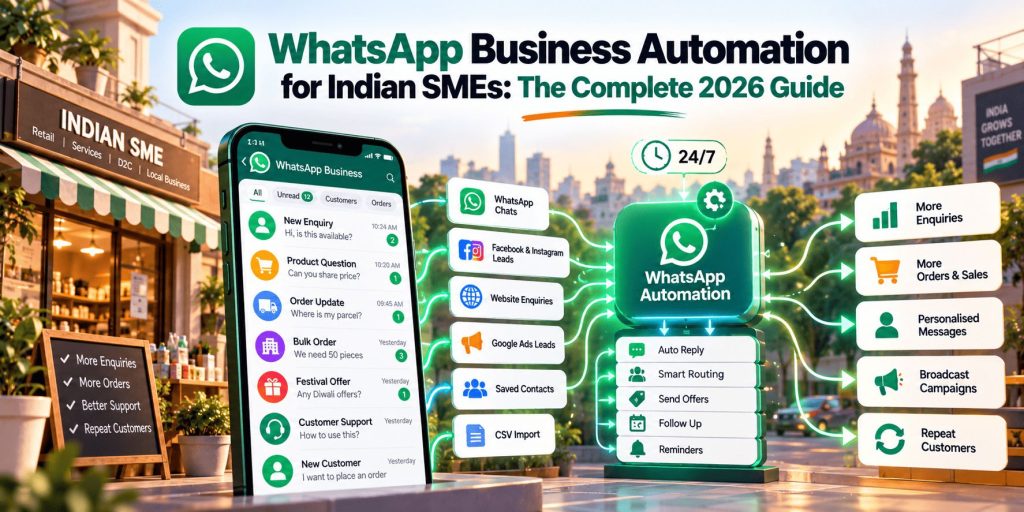
That habit is exactly why WhatsApp has become the most practical marketing channel for small and medium businesses in India. Hundreds of millions of people here use it every day, it works in regional languages and voice notes, and it feels personal in a way that email and SMS never quite managed. The challenge is that what works for ten chats a day falls apart at a hundred. That is where automation comes in.
This guide walks through how Indian SMEs can set up WhatsApp Business properly, automate the repetitive parts without sounding like a robot, run campaigns that people actually welcome, pick the right tool, and understand what it all costs. We have updated it for October 2026, because a few things have changed this year that affect both your budget and your bot.
📢 What changed in 2026, in short
- May 2026: Meta launched Business AI in the WhatsApp Business app in India. It can answer customer questions and capture leads for you, in Indian languages, without a separate chatbot tool. It is rolling out to eligible businesses, so check whether your account has it (Tools → Your Business AI).
- 1 October 2026: On the paid WhatsApp Business Platform, replies you send inside the 24-hour customer-service window are no longer entirely free. The first 1,000 per business number each month stay free; after that they are charged. Utility messages sent inside the window are also charged now. Automated replies count.
- 15 January 2026: Meta’s WhatsApp Business terms now prohibit general-purpose AI assistants (the “chat with any AI on WhatsApp” type) from using the platform as their main product. Bots that help your own customers are still allowed.
- November 2025: India’s data protection Rules (under the DPDP Act) were notified. Most obligations for businesses apply from May 2027, so now is a good time to tidy up how you collect consent.
Why WhatsApp Business Marketing Matters for Indian SMEs
Where your customers already are
India’s digital growth has put a smartphone and cheap data in almost every hand, including in Tier 2 and Tier 3 towns where websites and apps have always been a harder sell. WhatsApp is the one app nearly everyone already opens. For many customers it is how they ask questions before buying, how they follow up on an order, and increasingly how they find and contact local businesses.
For a small business that means you don’t have to teach customers a new habit. You only have to show up properly where they already are.
What it gives a small business
✔ It is affordable to start. The WhatsApp Business app is free. You can begin with a phone you already own and spend nothing but time. The paid platform comes later, if and when your volume justifies it.
✔ It reaches the whole country, not just metros. WhatsApp supports Hindi, regional languages and voice messages, which matters in cities like Indore and Bhopal and in smaller towns where customers are more comfortable speaking than typing.
✔ It builds trust through a real conversation. A customer who gets a quick, friendly reply from a named business tends to stay. Automation, done well, protects that feeling at scale instead of replacing it.
Setting Up WhatsApp Business: The Foundation
Choose between the app and the platform
There are two versions, and most confusion in this topic comes from mixing them up.
| 📱 WhatsApp Business App | ⚙️ WhatsApp Business Platform (the "API") | |
|---|---|---|
| Cost | Free | Pay per message, plus a provider's plan fee |
| Best for | Solo owners and small teams starting out | Growing teams, higher volumes, CRM and chatbot needs |
| Devices | Your phone plus a few linked devices | Many agents through a provider's dashboard |
| Automation | Welcome message, away message, quick replies | Chatbots, workflows, templates, integrations |
| Broadcasts | Lists of up to 256 contacts who have saved your number | Template messages to opted-in customers, within messaging limits |
| Setup | Download and go | Through an approved provider |
Our advice
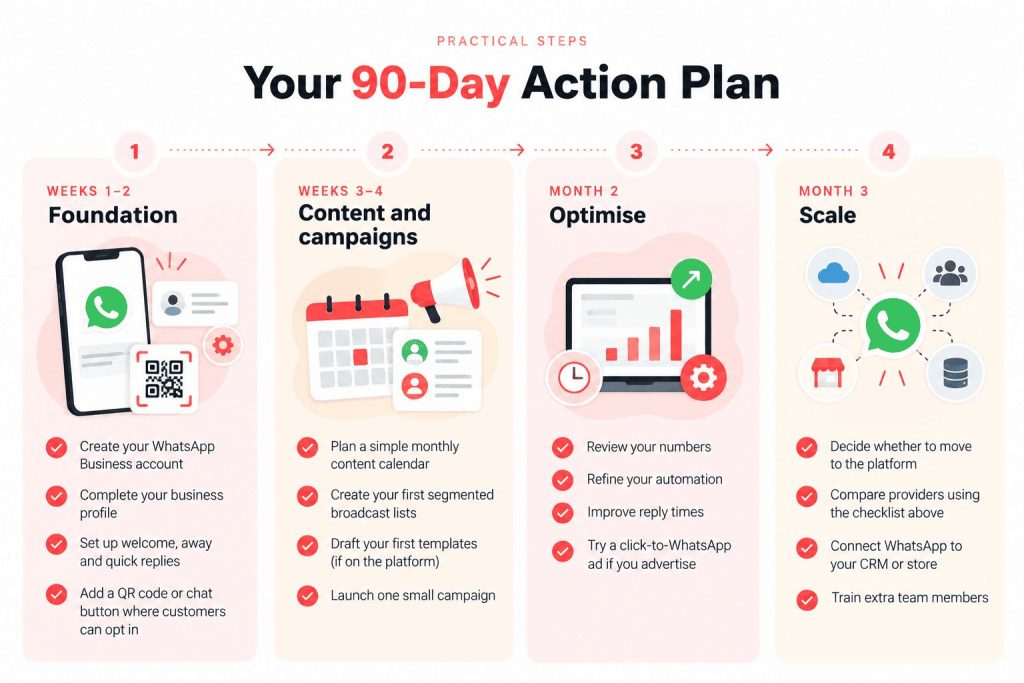
Our advice is simple: start with the free app. Move to the platform when you need several people answering from one number, when you want automation beyond basic replies, when you want to connect WhatsApp to your CRM or store, or when your chats grow beyond what one phone can handle.
Make your business profile look trustworthy
Your WhatsApp profile is your digital shop front. Customers judge it in a few seconds, so fill it in completely:
Your business profile checklist
Complete each detail to help customers recognise and contact you.
Verify your business
Verifying your business with Meta builds trust with customers and is usually needed to raise your messaging limits on the platform. Some businesses also qualify for an official badge next to their name. Meta's requirements for these change from time to time, so check the current ones on Meta's help pages before you plan around them.
Using WhatsApp Business on your computer
You don't have to answer every customer from a phone screen. WhatsApp Business can be linked to a computer through WhatsApp Web in your browser or the desktop app for Windows and Mac. Open Linked devices in the app on your phone and scan the QR code on the computer. It is a small change that makes a big difference at a shop counter or an office desk, where a full keyboard makes replies faster and lets more than one person help. Open the app on your phone every so often so the link stays active.
WhatsApp Business Automation: Where the Time Savings Come From
Think of automation in three levels. Most SMEs only ever need the first two.
Level 1: Basic automation (WhatsApp Business app)
- Welcome messages
- Away messages
- Quick replies
- Auto-responses for business hours
Level 2: Advanced automation (WhatsApp Business Platform)
- Chatbot integration
- automated workflows
- CRM synchronization
- Analytics and reporting
Level 3: AI-powered automation
- Natural language processing
- Intelligent routing
- Predictive responses
- Advanced analytics
Since Level 3 replies are generated automatically, running them through a tool to humanize AI text before they go live keeps the tone conversational instead of robotic.
💡 A rule to know about AI on WhatsApp. Since 15 January 2026, Meta’s WhatsApp Business terms don’t allow general-purpose AI assistants to use the platform as their main product. AI that serves your own customers — answering product questions, tracking orders, qualifying leads — is still fine. In practice: keep your bot focused on your business, tell customers when they are talking to automation, and always make it easy to reach a real person.
Meta’s own AI: Business AI in the WhatsApp Business app
In May 2026, Meta launched Business AI for small businesses in India. It is built into the free WhatsApp Business app, so you don’t need a separate chatbot provider to try it. According to Meta’s announcement, it can answer customer questions about your products, prices, discounts and shipping, use the information in your profile and catalogue, capture leads and book appointments, and it works in Indian languages. Meta has also said it plans to let customers pay by UPI inside the chat.
How to find it: open the app, go to the Tools tab and look for Your Business AI. Meta says it is rolling out to eligible businesses, so you may not see it yet. If you do, setup is a short guided process where you give it your catalogue and business information.
Before you switch it on:
- Check what it knows. It answers from what you give it, so an outdated price or policy will be repeated with confidence.
- Test it first. Ask it 30 to 50 awkward questions: refunds, delivery delays, out-of-stock items, an angry customer. Fix what it gets wrong.
- Decide what a person handles. You can step into any chat, adjust how it works, or turn it off, so decide in advance which chats you’ll take over.
- Tell customers. A short line such as “You’re chatting with our assistant. Type ‘agent’ to reach a person” avoids confusion.
- Check the cost. As of October 2026 we couldn’t find a confirmed India price, and reports suggest paid plans are planned. Look at the Business AI page in your app before you rely on it.
This is different from the January rule above. Business AI answers for your own business, which is not what that rule is aimed at.
Using AI behind the scenes. The most useful everyday win isn’t a clever bot. It is using an AI assistant such as Claude, ChatGPT or Gemini to do the writing groundwork. Ask it to draft template wording in your tone, turn your price list and policies into a clean FAQ, rewrite replies in simple Hindi or your regional language, or suggest festival campaign ideas. You read it, correct anything wrong, and paste the final version into your quick replies or templates. For live customer chats, you now have two routes: Meta’s own Business AI (see below), or the AI assistant many providers include. Either way, make sure it is limited to your business, and test it with awkward questions before it talks to real customers.
Setting up basic automation
1. A welcome message that does real work
A good welcome message greets the customer, says who you are, sets expectations for response time, and offers quick options. Here is an example you can adapt:
नमस्ते! Welcome to [Your Business Name] 🙏

Thank you for contacting us! We're here to help you with:
🛍️ Product inquiries
📦 Order tracking
💬 Customer support
🚚 Delivery information

Our team will respond within 2 hours during business hours (9 AM - 7 PM).

Type 'MENU' to see our product catalog!
Keep your promised response time honest. A message that says “within 2 hours” and then takes a day does more damage than no message at all.
2. Quick replies for questions you answer every day
Write short, friendly templates for the questions you keep typing out:
- Product information
- Pricing details
- Delivery timelines
- Return policies
- Payment methods
Save them with a short shortcut so any team member can send them in a second, in your own tone.
3. Away messages
Set a polite away message for after hours, holidays and weekends, and for the days you are overloaded. Tell the customer when to expect a reply. Customers forgive waiting; they don’t forgive silence.
Advanced automation strategies
Choosing a tool: inboxes, chatbots and automation platforms
Before you pay for any of these, check whether Meta's own Business AI (above) already covers what you need. If you mainly want automatic answers to common questions, it may. Providers earn their fee when you need a shared inbox for several agents, campaigns and templates, or links to your store or CRM. You don't need to build a chatbot from scratch. Most SMEs connect to a provider that handles the technical side: they give you a shared inbox for your team, a way to send approved templates, and a builder for simple automated flows. Here is how the names that keep coming up in India compare, in plain terms:
| Tool | Good for | Worth knowing |
|---|---|---|
| Interakt ↗ | Small online sellers and local businesses | Built with Indian SMEs in mind, simple inbox, popular with store owners, also supports Instagram chats |
| AiSensy | Campaigns, broadcasts and D2C brands | Marketing-focused, with chatbots and click-to-WhatsApp ad features, often shortlisted for its low entry price |
| WATI | Team inbox for support and sales teams | One of the better-known providers; check how pricing grows with team size and contacts |
| Gupshup ↗ | Larger or growing businesses, regional languages | India-focused and usually a better fit once you outgrow the basics |
| Bird (formerly MessageBird) ↗ | Multi-channel customer communication | Handles WhatsApp alongside other channels |
| ManyChat | Businesses that mainly want to automate Instagram DMs, and WhatsApp too | Began with Instagram and Messenger; WhatsApp is one of its channels |
| Twilio | Teams with a developer | Building blocks for custom WhatsApp solutions, not a ready-made inbox |
| n8n | Technical founders who want to build their own flows | A workflow tool that can connect WhatsApp to your other apps; needs more setup |
Tools and plans change quickly, so treat this as a starting list and not a ranking. Compare three or four on the things that affect you: the monthly fee, any markup they add on top of Meta's message charges, how much help you get with template approval, how good support is when something breaks, and whether they connect to the tools you already use, such as your store, CRM or accounts software. Also ask whether you can keep using your existing number on the Business app while you use the platform. Meta now allows this in some setups (often called Coexistence), and not every provider supports it.
If you're technical, or have a developer:
If you're technical, or have a developer: a tool like n8n lets you connect WhatsApp to your spreadsheets, CRM or store. For example, you could send an order update when a row changes, or log every new enquiry automatically. It is powerful and inexpensive, but you are responsible for the setup, security and fixes. For most small businesses, a ready-made provider is the safer first step.
Automated workflows
Workflows are simply "when this happens, send that." Two that suit most Indian SMEs:
Order management
Customer places order
Automated confirmation message
Order processing notification
Dispatch alert with tracking
Delivery confirmation
Feedback request
Lead nurturing
Initial inquiry
Product information sharing
Follow-up after 24 hours
Special offer (if no response)
Final follow-up
Move to different nurture sequence
Keep these short. Two or three well-timed messages work better than a long drip that feels like pressure.
Connecting WhatsApp to your other systems
CRM
CRM: keeps every customer's history in one place so any team member can pick up a conversation, and lets you tag leads by interest.
Online store
Online store: sends order confirmations, shipping updates and return details automatically, and can share live stock information.
Payments
Payments: payment links, reminders and invoices sent in the same chat where the customer asked.
Getting Opt-Ins the Right Way
This is the part many small businesses skip, and it causes most of the trouble later. Marketing messages should only go to people who have said yes to hearing from you on WhatsApp. Good ways to collect that yes:
- A QR code in your shop, on the billing counter or on packaging, that opens a chat with a prefilled “Hi, I’d like updates and offers”
- A WhatsApp button on your website and Google Business Profile
- A checkbox at checkout that clearly says “Send my order updates and offers on WhatsApp”
- A click-to-chat ad (more on that below), where the customer starts the conversation themselves
- A simple reply keyword, like “Send me offers”, in your welcome message
Keep a note of when and how each person opted in. Not only does this keep WhatsApp happy, it is also the habit that will make the new data protection rules easy for you later.
Click-to-WhatsApp Ads: Turning Ad Clicks into Conversations
If you advertise on Facebook or Instagram, there is a simple way to connect those ads to WhatsApp. A click-to-WhatsApp ad shows a button that opens a chat with your business instead of sending people to a website.
This works especially well for businesses where a conversation closes the sale: coaching centres, clinics, salons, real estate, custom orders, B2B services and anything where customers have questions before they buy. Instead of filling out a form that may never be answered, the customer sends one message and you reply while they are still interested.
Some practical notes:
- Have your welcome message and quick replies ready before the ads go live, so the first reply is instant.
- Meta has offered a free window for chats that start from these ads (as of this update, 72 hours), but the terms change, so check the current rules in Ads Manager.
- Track the chats that turn into sales, not just the number of clicks. Chats are cheaper than leads from forms, but the real measure is how many become customers.
If you’d like help setting up the ad side, our Meta Ads team does this for local and e-commerce businesses.
Creating Effective WhatsApp Marketing Campaigns
1. Broadcast lists
Broadcasts are the simplest way to send an offer to many people at once on the free app. A few things to know:
- A list holds up to 256 contacts
- Only contacts who have saved your number will receive the message
- It’s best to split your audience instead of sending everything to everyone
Ideas for splitting your customers in a way that makes sense for Indian businesses:
- By city or neighbourhood
- By what they have bought before (premium vs budget buyers)
- By product interest
- By festival buyers (people who only come at Diwali or wedding season)
- By language preference
Clean your lists regularly. People who haven’t replied in months drag down your quality and annoy people who didn’t want to be there.
2. Content that works on WhatsApp
WhatsApp is a personal space. The messages that work feel like they come from a person you know, not a company:
- Product catalogues with clear photos and prices
- Short behind-the-scenes videos
- Customer testimonials (with permission)
- Quick how-to tips
- Festival and seasonal greetings
A simple rhythm is enough: one useful message, one offer. Don’t message daily unless customers have asked you to.
3. Promotional campaigns
Flash sales: a short offer, a few hours long, exclusive to WhatsApp customers, with one clear button or reply to claim it.
Festival marketing: a pre-festival heads-up, a special collection, gift packaging options, and extended return windows. Festivals are the one time of year when customers expect to hear from you.
WhatsApp Business Platform: Features Worth Knowing
What people mean by "API", "Cloud API" and "the platform"
You will see several names for what is really one paid product: WhatsApp Business Platform, WhatsApp Business API, or simply WhatsApp API. They all refer to the paid version for businesses that want automation and several agents on one number.
The Cloud API
The Cloud API is Meta's own hosted version of that platform. Meta runs the servers, so you don't have to host anything yourself, and it has largely replaced the older self-hosted setup. Most providers in India build on it. You can reach it in two ways. The first is through a provider, which is the simplest route because the inbox, templates and chatbot builder come ready-made. The second is directly through Meta's developer tools, which can look cheaper on paper but means you or a developer must build the inbox, automation and reporting yourself. For almost every SME, the provider route makes sense. Go direct only if you have technical help and a specific reason.
1. Message templates
On the platform, if you want to message a customer outside the 24-hour window, or send a marketing message at all, you need a template that Meta has approved. Templates fall into categories, and the category decides what you pay:
| Category | What it is for | Examples |
|---|---|---|
| 📣 Marketing | Promotions and re-engagement | Offers, new arrivals, abandoned-cart nudges |
| 📦 Utility | Updates about something the customer did | Order confirmations, delivery updates, payment reminders |
| 🔐 Authentication | Verification codes | OTPs |
| 💬 Service | Not a template at all: free-form replies inside 24 hours of a customer messaging you | Answering a customer's question |
Template approval
Template approval: submit the template, follow Meta's content guidelines, and wait for review, which is often done within a day and sometimes within minutes. Test it before you go live. Templates that sound like pure advertising but are submitted as "utility" tend to get rejected or re-categorised.
2. Rich media
Images
Up to 5 MBVideos
Up to 16 MBDocuments
Up to 100 MBAudio messages
Location sharing
Keep images light for mobile viewing, videos under 30 seconds, and always add a short caption so the message makes sense on its own.
3. Interactive messages
Button messages
Button messages: quick-reply buttons, call-to-action buttons, URL buttons and location buttons.
List messages
List messages: product categories, service options, FAQ topics and menu selections.
Buttons reduce typing, which matters a lot for customers on small screens.
4. Messaging limits and account quality
On the platform, the number of different customers you can start conversations with each day is capped, and that cap rises in steps as your account quality and verification improve. WhatsApp watches how people respond to you. If many recipients block or report your messages, your quality rating drops, your limits can be reduced, and in serious cases the number can be restricted. The fix is the same as in everything else: message only people who opted in, send things they want, and make opting out easy.
Measuring Success
You don’t need a complicated dashboard. Start with a handful of numbers and watch how they move month to month.
Engagement
- How many customers read your messages
- How many reply
- How many click a link or button
- How many go on to buy
Business results
- Sales that started from WhatsApp
- Cost of getting a customer through WhatsApp
- Repeat purchases from WhatsApp customers
- Average order value
Operations
- How fast you reply
- How long it takes to resolve a query
- What share of chats your automation handles on its own
- Customer feedback
Rather than chasing a universal “good” percentage, compare yourself with your own previous month. If you run ads or send links, add UTM tags so Google Analytics shows which chats turned into sales. WhatsApp Business app insights (messages sent, delivered, read, profile visits, catalogue views) and your provider’s dashboard fill in the rest.
Legal and Compliance Considerations
WhatsApp’s own rules
- No spam or unsolicited messages
- Accurate business information
- Respect customer preferences, including opt-outs
- Follow WhatsApp’s commerce and messaging policies
India’s data protection law
The Digital Personal Data Protection (DPDP) Act, 2023 now has its Rules, which were notified in November 2025. Most obligations for businesses apply from 13 May 2027, so there is time, but it is much easier to build good habits now than to fix them later. In practice that means:
- Ask for clear, specific consent before collecting and using phone numbers
- Keep a record of when and how people opted in
- Collect only what you need
- Make it easy for people to withdraw consent or ask for their data to be removed
- Keep customer data secure
If an AI assistant answers your customers, you are still responsible for what it says. Wrong prices, delivery promises or refund terms can lead to complaints, and if it collects names, numbers or addresses, the same consent and data-minimizing habits apply.
Consumer rules
- Show clear prices
- Advertise honestly
- State your return policy
- Handle complaints properly
This is general information, not legal advice. If you handle sensitive data or run at scale, speak to a lawyer.
Common Challenges and What to Do About Them
⚠️ “I’m drowning in messages.” Use quick replies and a simple chatbot for the repeat questions, route the rest to a person, and put your top FAQs in a catalogue or a saved message.
⚠️ “People keep unsubscribing.” You are probably sending too often or to the wrong people. Segment your list, personalise the message, send less, and say clearly what the customer gets from hearing from you.
⚠️ “My messages aren’t being delivered.” Check that people have saved your number (for broadcasts), that your templates are approved (on the platform), and that your quality rating hasn’t dropped because of blocks or reports.
⚠️ “My costs went up in October.” If you’re on the platform and your bot answers a lot of customer messages, you may now cross the 1,000 free service messages per number each month. See the cost section below, and check your provider’s usage report.
WhatsApp API Pricing in India: What WhatsApp Business Really Costs (Updated October 2026)
The free WhatsApp Business app costs nothing to use. The WhatsApp Business Platform (the “API”) has two layers of cost: Meta’s per-message charges, and the monthly plan or markup from the provider you connect through.
Meta’s approximate India rates per delivered message, before 18% GST:
| Message type | Used for | Approx. rate |
|---|---|---|
| Marketing | Offers, broadcasts, re-engagement | ₹0.8631 |
| Utility | Order, payment and delivery updates | ₹0.115 |
| Authentication | OTPs | ₹0.115 |
| Service | Your replies within 24 hours of a customer messaging you | Free for the first 1,000 per number each month, then ₹0.115 (from 1 October 2026) |
Utility messages sent inside an open 24-hour window are now charged at the utility rate too, without the free allowance. Rates can change, so confirm the latest numbers on Meta’s pricing page before you plan a budget.
Provider fees. Plans vary a lot. Entry plans at several Indian providers start at roughly ₹500 to ₹1,600 a month, and higher tiers cost more. Compare what each plan actually includes (agent seats, chatbot builder, template help) and not just the headline price. Some providers also add a markup on top of Meta’s per-message rates while others pass them through at cost, so ask before you sign up.
What about Business AI? It is built into the WhatsApp Business app, which is free to use. As of October 2026 we couldn’t find a confirmed India price for Business AI, and reports suggest Meta plans paid plans. Check the Business AI page in your app, and don’t build a budget around it until the price is clear.
A worked example. A shop with 1,000 opted-in customers sends two offer messages a month (2,000 marketing messages) and 1,500 order updates (utility messages):
- 2,000 × ₹0.8631 ≈ ₹1,726
- 1,500 × ₹0.115 ≈ ₹173
- Total ≈ ₹1,899 before GST, or about ₹2,240 with 18% GST — plus the provider’s plan fee
And for service replies: if one number sends 3,500 replies in a month, the first 1,000 are free and the other 2,500 cost about ₹288 at the list rate.
Other costs to plan for
- Chatbot setup: from almost nothing (a provider’s built-in builder) to a few lakh rupees for a custom build with integrations
- Staff time to train the team and keep content fresh
- Photography and video for your catalogue and campaigns
- CRM or store integration, if you want them
A simple, illustrative return example
Suppose a small retail business spends ₹15,000 a month on WhatsApp (provider fee, messages, tools and a share of someone’s time) and sees ₹1,50,000 in extra sales from it. At a 30% margin, that is ₹45,000 in gross profit. Subtract the ₹15,000 spent, and the net gain is ₹30,000, a 200% return on what was spent (₹30,000 ÷ ₹15,000).
Your numbers will differ. The point isn’t that you’ll get exactly this; it is that you can work out your own version in ten minutes with real figures, and you should before spending more.
Where WhatsApp Marketing Is Heading
A few directions worth keeping an eye on:
- More automation inside business rules. I helpers that answer questions about your own products, like Meta’s Business AI, with guardrails on what they can do. Meta has also said UPI payments inside chats are on the way.
- Better shopping inside chats. Catalogues, order tracking and payment links in the same thread.
- Voice and video. Voice notes remain hugely popular in India, and businesses that answer well in voice stand out.
The practical way to prepare is unglamorous: keep your customer list clean, keep your consent records tidy, keep your content useful, and learn each new feature one at a time.
Conclusion
WhatsApp Business marketing automation is one of the most practical growth tools an Indian SME has right now. It reaches customers where they already are, it keeps costs low if you start small, and it lets a small team handle more conversations without losing the personal feel that made customers message you in the first place.
The businesses that do well with it are not the ones with the fanciest bots. They are the ones that ask for permission, reply quickly, send useful messages, and keep an eye on their numbers. Start with the free app. Add automation where you feel the pain. Move to the platform when your volume demands it, and budget with the new per-message pricing in mind.
If you’d like a second pair of eyes on your setup, we’re happy to help.
Ready to Make WhatsApp Work for Your Business?
Digital Dawn helps Indian SMEs set up WhatsApp Business, automate the repetitive parts, and connect it to ads and online stores so more chats turn into customers. Whether you’re just starting or moving to the platform, we’re happy to talk it through.
Get in touch:
- Call/WhatsApp: +91-9644940497
- Email: hello@digitaldawn.in
- Website: www.digitaldawn.in
Related services: Meta Ads · Social Media Marketing · Ecommerce Marketing · Performance Marketing · AI Lead Generation in India