
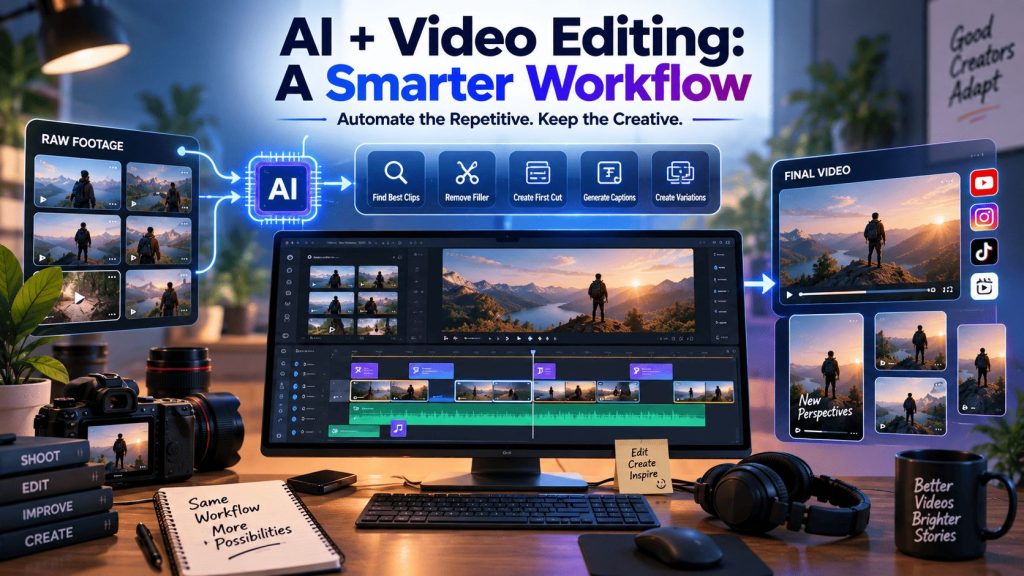
Adding AI to a video editing workflow does not mean handing an entire project to an automated tool. For most editors and creators, the more practical approach is to keep the workflow they already understand and use AI where it can reduce repetitive work.
That could mean searching through hours of footage, identifying usable takes, removing filler, assembling a first cut, or creating different versions of an existing edit. The creative decisions can still stay with the editor.
The key is knowing where AI fits. This guide looks at how to introduce AI into an established video editing process without disrupting the parts of the workflow that depend on human judgment.
Start With the Workflow You Already Have
Before choosing an AI video editing tool, map out the steps you already follow.
A typical project might look something like this:
- Import and organize footage
- Review clips and takes
- Find the strongest material
- Build a rough cut
- Refine the story and pacing
- Clean up audio
- Apply visual adjustments and color treatment
- Create cutdowns and alternate versions
- Review and export
Not all of these steps need to be automated.
For example, an editor might want to personally decide which interview answers belong in the final story but use AI to locate those answers across several hours of footage. Another editor may be comfortable having AI assemble the first cut and then taking over for pacing and structure.
Start by identifying the tasks that consume significant time but require relatively little creative judgment. Those are usually the easiest places to introduce AI.
Identify What AI Should Actually Handle
The most useful AI workflows separate creative decisions from repetitive execution.
Consider a three-hour interview with multiple takes. An editor needs to decide which responses tell the story best, but getting to those decisions involves a lot of operational work. Someone has to review the footage, compare takes, remove false starts, identify repeated answers, and arrange the selected clips.
AI can assist with those preparation-heavy tasks.
This does not mean the AI should determine the entire story. Instead, it can reduce the amount of manual work required before the editor starts making detailed creative decisions.
The same principle applies to other projects. If you regularly spend hours finding clips, removing obvious filler, creating rough assemblies, or preparing multiple versions, those tasks may be good candidates for AI assistance.
Keep AI Connected to the Editing Timeline
One of the most important considerations is where AI performs its work.
There is a difference between using AI to generate a new video and using AI to work with footage that already exists in an editing project. If you have interviews, B-roll, multiple camera angles, music, graphics, and several takes, generating new media does not solve the core editing problem. You need to understand and organize the material you already have.
This is where the invideo editor can fit into an existing workflow. It combines a professional editing timeline with AI editing agents that can work on assigned tasks using your footage and direction. Instead of treating AI as a separate generation step, you can use it to work with existing footage, build an initial assembly, and then review and refine the result directly on the timeline.
For editors looking for an AI video editor online, this type of workflow can be more practical than starting a project from scratch with generated media. You can inspect the cuts, change the pacing, replace takes, and make manual adjustments while keeping the editing process under your control.
The goal is not to replace the timeline or the editor’s judgment. It is to use AI for time-consuming editing tasks while keeping creative decisions where they belong.
Use AI for the First Cut
The first assembly is often one of the strongest use cases for AI.
A base cut is a complete initial timeline built from usable footage. It removes obvious repetition, mistakes, pauses, and filler, but it is not supposed to be the finished edit.
Imagine recording a product video across six takes. Some takes contain mistakes, others have awkward pauses, and one has the strongest delivery. Manually reviewing and assembling that material can take considerable time.
An AI editing agent can help identify usable material and create an initial assembly based on instructions such as:
Build a concise product video using the strongest take for each section. Remove false starts and repeated lines while keeping the original structure.
The editor can then review the timeline and make the decisions AI cannot reliably make on its own. Perhaps a slightly longer pause works better for the tone. Maybe a different take has more personality even though the delivery is not technically perfect.
The point of AI-assisted assembly is to create a useful starting point, not to remove the editor from the process.
Give AI Clear Editing Direction
The quality of an AI-assisted workflow depends partly on the quality of the instructions.
A vague request such as “edit this footage” leaves too much open to interpretation.
A better instruction might specify:
- What the video is about
- Who it is for
- Which sections matter most
- What should be removed
- Desired duration
- Preferred structure
- Any footage or takes that should be prioritized
For example:
Create a five-minute interview cut focused on the guest’s three main recommendations. Remove repeated answers and long pauses. Keep the strongest delivery for each point and maintain a logical progression from introduction to conclusion.
This gives the AI an editorial objective rather than simply asking it to make a video.
You can also refine the result through follow-up instructions. If the first assembly is too long, ask for a shorter version. If a section feels repetitive, direct the agent to tighten it. The workflow becomes iterative rather than one-and-done.
Keep Human Review at the Important Moments
AI can speed up execution, but review remains essential.
After an AI-assisted assembly, watch the entire sequence and check the things that affect the quality of the story.
Does the sequence make sense? Did an important piece of context disappear? Is the selected performance right for the tone? Does the pacing feel intentional? Are the transitions helping the story or simply connecting clips?
These questions require editorial judgment.
This is also why an editable timeline matters. With invideo editor, the AI’s work remains part of the editing project, allowing the editor to inspect changes, redirect the work, and continue editing manually.
🔥 The best workflow is therefore not “AI edits, human approval.” It is closer to collaboration: AI handles assigned execution, while the editor reviews, corrects, and shapes the result.
Use AI for Footage Search and Cleanup
AI can also help before and after the main assembly.
Searching large footage libraries is a common bottleneck. Instead of remembering filenames or manually opening dozens of clips, semantic search can help locate footage based on descriptions of what appears or happens in the material.
You might search for a specific person speaking, a particular scene, an object, an action, or a moment from an interview.
AI can also assist with repetitive cleanup tasks such as removing silence and filler, adding chapter markers, swapping takes, or restructuring sequences.
These tasks may seem minor individually, but they add up across long-form projects.
For editors handling regular YouTube videos, interviews, podcasts, documentaries, or commercial projects, reducing this operational workload can make the entire post-production process more manageable.
Use AI for Versioning, Not Just Editing
The main edit is often only the beginning.
A single project might need a full-length version, a shorter cut, a trailer, social clips, highlights, and versions adapted for different platforms.
Creating each version manually can mean repeating many of the same editing operations.
Once the core edit is established, AI can help with this versioning process. The editor still determines what each version needs to communicate, while AI can assist with the execution.
This is particularly useful for content teams that need to produce several outputs from the same source material.
For example, a 20-minute interview could become a full episode, a five-minute highlight, several short clips, and a promotional trailer. The creative direction changes slightly for each format, but the underlying footage does not.
An AI-assisted workflow can help reduce the amount of repetitive timeline work involved.
Add AI Without Rebuilding Everything
You do not need to replace your entire editing setup to benefit from AI.
A gradual approach is usually more practical.
Start with one recurring bottleneck. If footage review takes the most time, introduce AI there first. If creating rough cuts is the problem, test AI-assisted assembly. If versioning takes up hours at the end of every project, experiment with AI for cutdowns.
Then evaluate the results.
Did it actually save time? Did the output require excessive correction? Was the task appropriate for automation? Did the editor have enough control to make the final creative decisions?
If the answers are positive, expand the workflow gradually.
Tools such as invideo editor can fit into this approach because the AI agents are used for specific editing work rather than requiring the editor to abandon timeline-based editing altogether.
Know What Should Stay Human
There is no need to automate every part of video editing.
Storytelling, performance choices, emotional pacing, visual style, and final quality control often depend heavily on context and taste. These are areas where human involvement remains valuable.
A simple rule can help: automate execution before judgment.
Let AI help find footage, organize material, assemble alternatives, remove repetitive sections, or prepare versions. Keep the decisions that define the project’s voice with the editor.
That approach also makes AI adoption less disruptive. Instead of asking whether AI can replace an entire editing workflow, you are asking which parts of that workflow it can make easier.
Build a Workflow That Improves Over Time
The best AI editing workflow is rarely created in one afternoon.
Start with a single task and learn how the AI performs. Refine the instructions you give it. Identify where human review is most useful. Then gradually add other tasks that make sense for your projects.
Over time, this can create a division of work that is much more practical than full automation. AI handles repetitive execution and large-scale footage operations, while the editor spends more time on story, rhythm, performance, and final polish.
The goal is not to make the editor less involved. It is to make the editor’s time more valuable.
Conclusion
Making AI work with your existing video editing process is less about replacing your tools and more about changing how you divide the work.
Keep the timeline and creative decision-making process you already trust. Use AI for tasks such as footage review, semantic search, first-cut assembly, cleanup, restructuring, and versioning where those tasks genuinely reduce manual effort.
Most importantly, keep a human in the loop. AI can help turn hours of footage into a useful starting point, but the editor still decides what the finished video should say and how it should feel.
That balance makes AI a practical addition to an existing editing workflow rather than another tool that forces you to start from scratch.