
Last checked: 12 October 2026. Meta is changing this quickly, so we’ll keep updating this page.
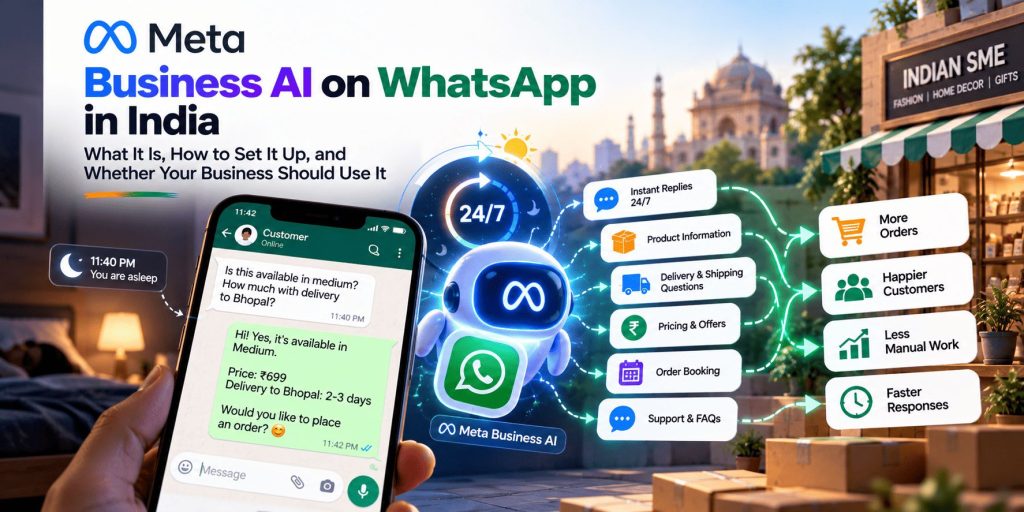
It is 11:40 on a Tuesday night. Someone has seen your Instagram post and sends a WhatsApp message: “Is this available in medium? How much with delivery to Bhopal?” You are asleep. By the time you reply at 9 the next morning, they have already ordered from a seller who answered in two minutes.
Most small business owners in India know this feeling. WhatsApp is where customers ask their questions, and no one can sit on it around the clock. Meta’s answer is to put an AI assistant inside WhatsApp Business itself, one that replies to customers on your behalf, in their language, at any hour.
This guide explains what that assistant is, what it can and can’t do today, how to set it up, what it costs, and who should try it now and who should wait. It is based on Meta’s own announcements and reliable news coverage. Where something isn’t confirmed, we say so.
In short
- What it is: an AI assistant from Meta that answers customer messages for your business on WhatsApp, using your profile, catalogue and information.
- Who gets it: eligible businesses, in a gradual rollout. Meta hasn’t published the full eligibility rules.
- What it costs: the WhatsApp Business app is free, and we couldn’t find an official price for the in-app tool. The version on the paid platform is billed per use (details below).
- Our view: worth trying if you get many repeat questions and your information is in good order. Treat it like a new team member, not a switch you flip and forget.
What Is Meta Business AI?
Meta Business AI is an AI assistant built into WhatsApp Business. You give it your business details, such as your products, prices, policies and opening hours, and it answers customer questions using that information. When something is beyond it, you can step into the chat yourself.
Meta introduced it for small businesses in India in May 2026. According to Meta’s announcement, it works inside the WhatsApp Business app, supports all native Indian languages, and needs no coding or separate tools.
A note on the names. You will see two names used, sometimes as if they were the same thing:
- Business AI is how Meta introduced the assistant inside the WhatsApp Business app in India in May 2026.
- Meta Business Agent is the broader name Meta uses for its AI agent for businesses across WhatsApp, Instagram and Messenger. Meta announced it globally in June 2026, and launched it for Indian WhatsApp Business users on 7 July 2026, in phases, with a waitlist. Meta also offers a separate “Business Agent Platform” for large companies that want to build their own, and big names such as Flipkart and Swiggy are reported to have signed up.
The two overlap, and Meta’s naming is still settling. When you check your own account, look for whichever name your app shows.
What It Can Do Today
Based on Meta’s announcements, the assistant can:
- Answer common questions about your products and services, prices, discounts and shipping, using what is in your profile and catalogue
- Reply around the clock, including late at night and during busy rushes
- Recommend products from your catalogue
- Capture leads by collecting a customer’s details and interest
- Book appointments
- Hand over to you. You can step into a chat whenever you want, adjust how the assistant behaves, or turn it off completely
- Work in Indian languages
Meta has also said the Business Agent can send business owners a “morning briefing” that summarises chats they missed overnight.
🔥 What is still “coming soon”: in May, Meta said the assistant would soon be able to help customers pay through UPI inside the chat. We couldn’t confirm whether that is live yet, so check on your own account before promising it to customers.
🚫 What it isn’t: a replacement for judgement. It answers from the information you give it, so it is only as good as that information. It doesn’t know about a price you changed this morning unless you update it.
Who Can Use It
Not every business can switch it on yet. Meta says Indian small and medium businesses must meet certain criteria to be eligible, and hasn’t spelled those criteria out in its announcement. The rollout is gradual, and the Business Agent has a waitlist.
The practical way to find out is to check your own app:
- Update the WhatsApp Business app to the latest version.
- Open the Tools tab.
- Look for Your Business AI.
If you see it, you are eligible. If you don’t, it hasn’t reached your account yet, and Meta has said it is rolling out in phases. You can join the Business Agent waitlist through Meta’s business pages.
A practical setup guide
How to Set It Up
Meta says setup is a short guided process, and one small business featured in its announcement said they got going in a few hours. Your app may look slightly different from the steps below, since the rollout is gradual.
Step 01
Step 1: Prepare your information first
This is the step that decides whether the assistant helps or hurts. Before you open the setup screen, tidy up:
- ✓ Your business profile: correct address, opening hours, website, a clear description
- ✓ Your catalogue: accurate names, prices and availability. An old price will be repeated with confidence
- ✓ A short FAQ and policy sheet: delivery times and charges, payment methods, returns and exchanges, warranty, cancellation, how to place a custom order
- ✓ Your tone: formal or friendly, English, Hindi or Hinglish. A few sample replies you like will help
One business in Meta's announcement said they uploaded their catalogue and documents and the assistant learned the details and tone from them.
Step 02
Step 2: Turn it on
Go to Tools → Your Business AI and follow the guided steps. Meta says you stay in control throughout: you can step into conversations, change how it works, or turn it off.
Step 03
Step 3: Test it before customers do
Don't let it speak to real customers until you have tried it yourself. Message your own business number from another phone and ask it awkward questions. A good test list has 30 to 50 questions, including:
- ✓ "What's the price of X?" for items you changed recently
- ✓ "Do you deliver to [a small town near you]?"
- ✓ "I want a refund." and "My order is late."
- ✓ A message in Hindi, one in English, and one in Hinglish
- ✓ A question it shouldn't be able to answer ("Will this cure my back pain?")
- ✓ An angry customer
- ✓ "Can I speak to a person?"
Write down anything wrong and fix the information behind it.
Step 04
Step 4: Start carefully
For the first two weeks, read the chats the assistant handles every day. You will spot mistakes quickly, learn what customers actually ask, and find gaps in your information. Add what is missing, then gradually check less often.
What It Costs
This is where the picture is least clear, so we’ll separate what we know from what we don’t.
The app itself is free. The WhatsApp Business app costs nothing to use.
The in-app Business AI: we couldn’t find an official India price for it. Check the Business AI screen and Meta’s help pages before you plan around it.
Meta Business Agent on the paid platform: according to Meta’s pricing information as reported by several WhatsApp providers, it was free to build and test during July 2026 and has been billed per use since 1 August 2026. The rate is $2 for every million “tokens,” which are the small chunks of text the AI reads and writes. In plain terms, a typical reply uses roughly 20,000 to 25,000 tokens, which works out to about 4 to 5 US cents (a few rupees) per reply.
So, as a rough example, 1,000 AI-written replies would cost around $40 to $50, or roughly ₹3,500 to ₹4,500 at current exchange rates. Your real cost depends on how long the conversations are.
Two things to keep in mind:
- It costs more than an ordinary reply. On the platform, a reply that you or your team types costs far less in message fees than an AI reply. The AI’s value is in the late-night and rush-hour questions nobody has time for, not in routine replies you could send with a saved shortcut.
- Prices change. Please confirm the current figures on Meta’s WhatsApp pricing page before you budget. We cover WhatsApp’s wider pricing, including the October 2026 changes, in our WhatsApp Business automation guide.
Does It Actually Work?
Meta’s announcement features two small Indian businesses. One, a plant-based personal care brand, said its conversion rate rose to 80–90% once customers got answers at all hours. The other, a custom gifting business, said the assistant helps it close six to seven orders a day and that sales went up 40%.
Those are encouraging stories, but they are Meta’s own, self-reported by the businesses, and chosen to show the product well. We wouldn’t treat them as what a typical business will see. Independent results are still thin, because the tool is only a few months old in India.
What we can say is that the idea is sound for the right kind of question. Customers asking “what’s the price?”, “is it in stock?” and “do you deliver here?” want a quick, correct answer, and a well-prepared assistant can give one at 2 a.m.
What can go wrong
❌ Wrong or old information. If your catalogue says ₹499 and the price is now ₹599, the assistant will quote ₹499.
❌ Over-promising. Delivery dates, refund terms and “yes, we can do that” answers need clear limits. Spell out what it must not promise.
❌ Language slips. Test the mix of Hindi, English and regional words your customers really use, not just clean sentences.
❌ Tone. A cheerful reply to an angry customer reads badly. Decide in advance when a person takes over.
❌ Sensitive topics. If you handle health, legal or financial questions, don’t let an AI give advice on them.
Meta Business AI or a Chatbot Provider?
If you have read our guide to WhatsApp automation, you know the alternative: connecting a provider such as Interakt, AiSensy or WATI to the paid platform. Here is how the two routes compare in general terms:
| Meta Business AI (in the app) | A chatbot or inbox provider | |
|---|---|---|
| Setup | Short guided steps inside the app | Sign-up, connection, and often some setup help |
| Best for | Small teams with many repeat questions | Teams that need a shared inbox, campaigns and integrations |
| Control | You give it your information and rules | Often more detailed flows you design yourself |
| Team use | Mainly the owner or a small team on the app | Several agents working from one number |
| Broadcasts and templates | Not its job | Usually included |
| Store or CRM links | Limited | Often available |
| Cost | App is free; AI pricing not clearly published | Provider plan plus Meta’s message charges |
The two aren’t always either/or. Some businesses start with Meta’s assistant for common questions and add a provider later when they need a team inbox or campaigns. If you want to know more about the provider route, see the tools section in our WhatsApp guide.
Who Should Try It Now, and Who Should Wait
It is worth trying if:
- You get many repeat questions about price, availability, delivery or timings
- Messages arrive at night or during rushes that you can’t keep up with
- You sell products or book appointments: a sweet shop in Indore before Diwali, a boutique, a salon, a coaching centre handling admission enquiries
- Your catalogue and policies are in good order, or you are willing to tidy them first
- You can spend a few minutes a day reviewing chats in the first weeks
It is better to wait, or be very careful, if:
- Your sales are consultative or high-value, where a person’s judgement matters from the first message
- You work in a sensitive area such as health, law or finance
- Your prices and stock change many times a day and nobody can keep the information up to date
- You need several agents on one number, broadcasts or CRM links. A provider may fit better
- You can’t check the chats regularly
Using It with Click-to-WhatsApp Ads
If you run Facebook or Instagram ads that open a WhatsApp chat, an AI assistant could answer those new enquiries at any hour, so a lead from a 10 p.m. ad click doesn’t go cold. This is a practical idea and not something Meta has promised, so test it: look at how many ad chats get a first reply, how many continue, and how many become sales.
If you’d like help with the ad side or the setup, our Meta Ads team can work with you.
Privacy and the Law
An AI assistant talks to your customers and collects their messages, names and numbers. That has a few practical consequences:
- Be open with customers. A short line such as “You’re chatting with our AI assistant. Type ‘agent’ to reach a person” avoids confusion and builds trust.
- Collect only what you need. Don’t ask the assistant to gather more personal details than the job requires.
- Keep consent in mind. India’s data protection law is being phased in, and most obligations for businesses apply from May 2027. Good habits now will save you effort later.
- You are still responsible. Wrong prices, delivery promises or refund terms can lead to complaints, even when an AI wrote the reply.
This is general information, not legal advice. For anything sensitive, speak to a lawyer.
A One-Week Plan
| Day | What to do |
|---|---|
| 1 | Check Tools → Your Business AI. Gather your catalogue, prices, hours and policies |
| 2 | Clean up your profile and catalogue. Write a one-page FAQ and policy sheet |
| 3 | Turn it on if available. Write your 30–50 test questions |
| 4 | Test from another phone, in Hindi, English and Hinglish. Fix gaps |
| 5 | Decide when a person takes over, and add a short “you’re chatting with an AI assistant” line |
| 6–7 | Let it handle real chats, and read every conversation. Note mistakes and fix them |
After the first week, keep reading its chats for another week or two before you check less often.
Our Verdict
Meta Business AI is a promising tool for small businesses that are stretched thin on WhatsApp. Putting an assistant inside the free app lowers the barrier a lot, and being able to answer customers in their own language at any hour is a real advantage in India.
It is not magic. It works best for repetitive, factual questions, and it depends entirely on the quality of the information you give it. The pricing is still not clear for every kind of account, the rollout is gradual, and the results Meta quotes come from a handful of hand-picked businesses.
👋 Our advice: if it shows up in your app and you have a steady flow of repeat questions, try it for a week or two with your information in order and your eyes on the chats. If it doesn’t show up yet, use the time to tidy your catalogue and FAQ sheet. That work pays off whether you use Meta’s assistant or a provider’s.
Want Help Getting Ready?
At Digital Dawn, we help Indian businesses set up WhatsApp the sensible way: tidying catalogues and FAQs, planning tests, connecting click-to-WhatsApp ads, and choosing between Meta’s tools and a provider. If you’d like a second pair of eyes before you switch anything on, we’re happy to talk.
Get in touch:
- Call/WhatsApp: +91-9644940497
- Email: hello@digitaldawn.in
- Website: www.digitaldawn.in
Related reading:
WhatsApp Business Marketing and Automation Guide for Indian SMEs
Meta Ads Services
Social Media Marketing
AI Lead Generation in India
Sources:
Meta: Introducing Business AI on WhatsApp for Small Businesses in India
Deccan Herald: Meta Business Agent launched for Indian WhatsApp Business users
Meta: WhatsApp Business Platform pricing