
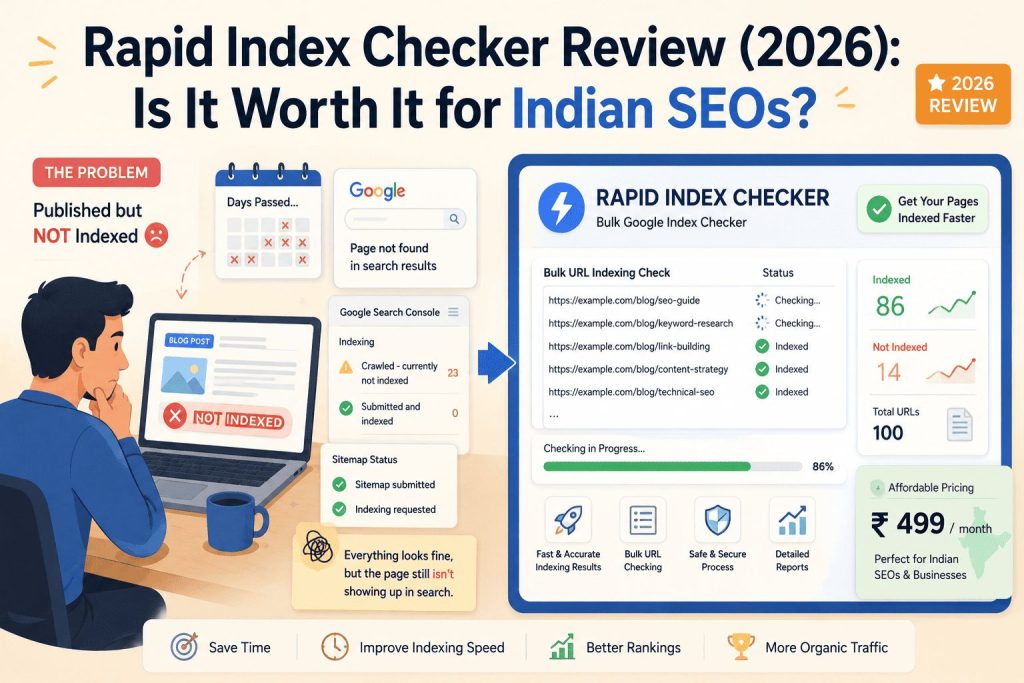
You published a blog post. A week passed. Then two. Google still hasn’t indexed it.
You checked Search Console. No errors. Sitemap submitted. Indexing requested. Everything looks fine — but the page simply isn’t showing up in search results.
This is one of the most frustrating problems in SEO, and it happens to Indian bloggers, agencies, and business owners more than most people admit. We went through it ourselves recently with one of our own posts on Digital Dawn — a fully optimized article that sat unindexed for weeks despite a clean bill of health in Search Console.
That experience is what led us to test Rapid Index Checker, a bulk Google index checker tool that launched in February 2026. This review covers what it actually does, who it’s genuinely useful for, what it costs, and whether it makes sense for Indian SEOs and small business owners.
What Is Rapid Index Checker?
Rapid Index Checker is a tool that tells you whether your web pages are indexed in Google — and more importantly, why they aren’t when they should be.
The core idea is simple: Google Search Console already shows you indexing status, but it’s slow. GSC data lags 3 to 4 days behind what’s actually happening in Google’s live search results. That means a page could vanish from Google entirely and you wouldn’t know about it through Search Console for days — by which point you’ve already lost traffic, rankings, and potentially leads.
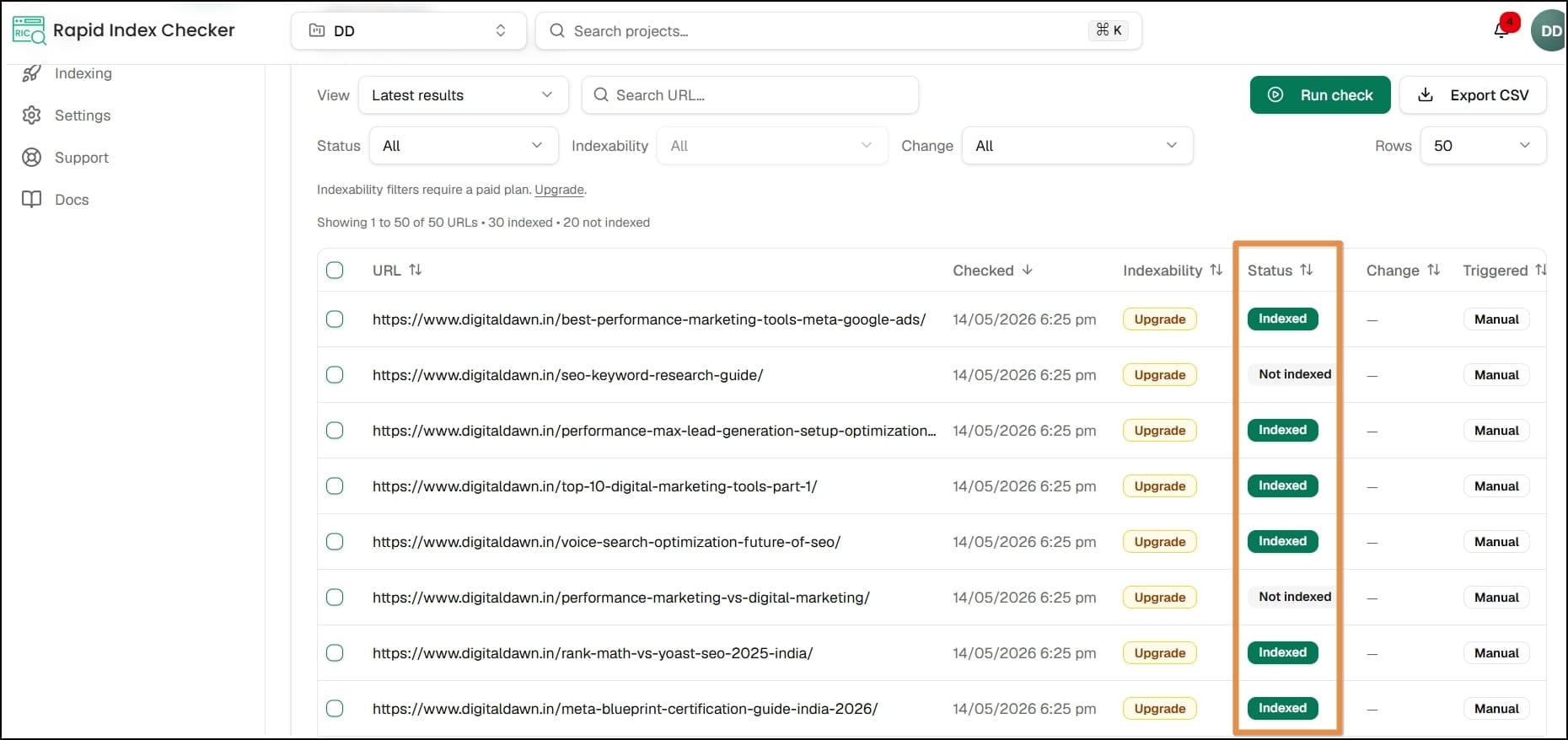
Rapid Index Checker skips the GSC data entirely. Instead, it queries Google’s live search results directly and tells you in real time whether a URL is indexed or not. It also checks URLs you don’t own — like backlinks on other people’s websites, guest posts, citations in directories, and competitor pages — which Search Console can’t do at all.
It launched in February 2026, built by GrowMatic Pte. Ltd., and has quickly become a go-to tool for SEO teams and agencies that manage multiple websites at scale.
The Problem It Actually Solves
Before getting into features, it’s worth being clear about what problem this tool is built for — because not everyone needs it equally.
Google has a concept called “crawl budget.” You can know more about it here. Google doesn’t crawl every website with the same frequency. High-authority sites like HubSpot or Amazon get crawled within hours of publishing. Newer blogs or lower-frequency sites like most Indian SMB websites can wait days or weeks for Googlebot to even discover a new page.
The frustrating part is that even when Googlebot does visit your page, indexing isn’t guaranteed. A page can pass all the standard checks — no noindex tag, no robots.txt block, clean canonical — and still not get indexed. Google calls this “crawled, currently not indexed” and gives you almost no information about why.
This is exactly the gap Rapid Index Checker fills. It doesn’t just tell you “indexed” or “not indexed.” It diagnoses the likely reason a page isn’t getting indexed, whether that’s a noindex tag, a robots.txt rule, a redirect chain, or a canonical conflict pointing Google somewhere else.
For Indian SEO agencies managing 10 or 20 client websites, or for bloggers who publish regularly and want to catch indexing issues early, this kind of visibility is genuinely useful.
Key Features
1. Bulk Index Checking via Live SERP Verification
This is the headline feature. You paste URLs, upload a CSV, or sync an XML sitemap, and Rapid Index Checker queries Google’s live search results for each one. It processes up to 200 URLs per second — meaning 10,000 URLs are checked in under 50 seconds and 100,000 in roughly 8 minutes.
The speed is genuinely impressive. Running a bulk index check manually through Search Console’s URL Inspection tool — which allows checking only one URL at a time — would take hours for the same list.
The live SERP verification also means you’re seeing what’s actually indexed right now, not what was indexed 3 to 4 days ago when GSC last updated. For anyone who has ever stared at GSC wondering if it’s actually current, this matters.
2. Indexability Diagnostics
Most bulk index checkers just show you a green or red status. Rapid Index Checker goes further — when a page isn’t indexed, it tries to tell you why by detecting four specific types of blockers:
- Noindex meta tags — a tag in the page’s code telling Google not to index it (often set accidentally in WordPress or Rank Math)
- Robots.txt blocks — disallow rules preventing Googlebot from even crawling the URL
- Redirect chains — multiple redirects in sequence that interrupt the crawl before the final content loads
- Canonical conflicts — a canonical tag pointing Google to a different URL, signalling that this page is a duplicate
This diagnostic layer is what separates Rapid Index Checker from simpler tools. Finding out a page isn’t indexed is useful. Finding out why in the same dashboard — without manually checking each technical element — is what saves actual time.
3. Third-Party URL Monitoring (No GSC Access Needed)
This is a feature that link builders and SEO agencies will find particularly valuable. Search Console only works for websites you’ve verified. Rapid Index Checker can check any public URL — which means:
- Checking whether a guest post you published on another site is actually indexed
- Verifying backlinks on external domains are indexed before reporting link equity to clients
- Monitoring competitor pages to track their indexing patterns
- Checking citations, press coverage, and directory listings
For an Indian digital marketing agency handling link building campaigns for clients, this removes a lot of manual work. You no longer need to do Google site: searches one by one to verify each backlink.
4. Scheduled Monitoring and Alerts
Set up automated checks on hourly, daily, weekly, or monthly schedules, and get email alerts or in-app notifications when a page’s indexing status changes — specifically when an indexed page drops out of Google.
De-indexing happens more often than most people realize. A site update, a plugin conflict, an accidental noindex toggle in WordPress, a server-side change — any of these can knock pages out of Google’s index quietly. Without monitoring, you might not notice until traffic has already dropped significantly.
The alert system catches de-indexing within hours rather than the 3 to 4 days it takes GSC to reflect the change. For agencies managing high-traffic client websites, early detection of a de-indexing event can prevent meaningful organic traffic loss.
5. Auto-Submit to Indexing Services
When Rapid Index Checker detects an indexable-but-not-indexed URL — one that passes all technical checks but still isn’t in Google — it can automatically submit that URL to a third-party indexing provider to try to accelerate discovery.
One important detail: this feature requires a separate account with a supported indexing service, and indexing credits are billed separately by that provider, not by Rapid Index Checker. The tool handles the submission and tracking; the provider handles the actual indexing push. This is worth understanding before assuming the feature is entirely built in.
6. API, Webhooks, and Team Workflows
On Pro plans and above, Rapid Index Checker offers a documented REST API for programmatic index checks, webhook support with HMAC signing and automatic retries, and team collaboration features with role-based permissions.
For agencies that want to feed indexing data into their own dashboards, reporting pipelines, or Zapier automations, this is genuinely useful. For a solo blogger or small business owner, these features are probably overkill — but they signal that the tool is built for scale and not just casual use.
7. Exportable Reports
Generate CSV data exports or PDF reports from your indexing data. For Indian SEO agencies reporting to clients monthly, having a clean PDF showing indexed pages, de-indexed pages, and trend data is a straightforward way to demonstrate ongoing work without building reports manually.
Pricing
Rapid Index Checker offers five plans:
| Plan | Price | Monthly Checks |
|---|---|---|
| Free | ₹0 | 150 checks |
| Lite | ~₹1,000/month ($12) | 3,000 checks |
| Pro | ~₹3,300/month ($39) | 12,000 checks |
| Team | ~₹10,000/month ($119) | 35,000 checks |
| Business | ~₹23,500/month ($279) | 80,000 checks |
→ Start free on Rapid Index Checker
Annual billing saves 2 months (pay for 10, get 12 months).
For one-time needs, non-expiring credit packs are available: 5,000 credits for $29 (~₹2,400), 12,000 for $59 (~₹4,900), and 30,000 for $149 (~₹12,400).
What’s right for whom:
📌 The free plan is enough to test the tool and run occasional spot checks on a small blog. At 150 checks per month, it covers a site with up to 150 pages checked once a month — fine for getting started.
📌 The Lite plan at ~₹1,000/month makes sense for freelancers or bloggers managing a single site with regular publishing. 3,000 checks per month covers most small-to-medium Indian blogs comfortably.
📌 The Pro plan at ~₹3,300/month is the sweet spot for Indian digital marketing agencies managing 3 to 5 client websites and doing active link building. The API access on this tier is also a meaningful upgrade.
The Team and Business plans are built for larger agencies or in-house SEO teams managing dozens of sites at scale.
One thing worth noting: pricing is in USD, so the actual INR cost will vary with exchange rates. At today’s rates the Lite plan works out to roughly ₹1,000/month, which is reasonable — but factor this in if you’re managing a tight marketing budget.
Rapid Index Checker vs. Google Search Console
This is the comparison most people need clarity on before deciding whether Rapid Index Checker is worth paying for.
| Feature | Google Search Console | Rapid Index Checker |
|---|---|---|
| Cost | Free | Paid (free tier available) |
| Verification method | GSC database (3–4 day lag) | Live SERP (real-time) |
| Daily URL check limit | 2,000 | Unlimited (plan-based) |
| Check URLs you don’t own | No | Yes |
| Scheduled monitoring | No | Yes (hourly to monthly) |
| De-indexing alerts | No | Yes |
| Indexability diagnostics | Basic | Detailed |
| Bulk CSV/sitemap import | No | Yes |
| PDF/CSV reports | Manual | Automated |
| API access | No | Yes (Pro+) |
The honest answer is that Search Console is genuinely good for most solo bloggers and small business owners who publish occasionally and don’t run active link building campaigns. If you’re managing one website with a modest publishing schedule, you probably don’t need Rapid Index Checker yet.
Where Rapid Index Checker earns its cost is when:
- You manage multiple client websites and need to check indexing status at scale
- You run link building campaigns and need to verify backlinks on external domains
- You’ve had indexing issues in the past and want automated early warning when pages drop
- Your site has a large content library (500+ pages) where manual monitoring isn’t realistic
For Indian agencies specifically, the ability to check third-party URLs — backlinks, guest posts, citation pages — without needing GSC access is a strong practical advantage during client reporting.
What We Like
✅ Real-time verification is genuinely useful. The 3 to 4 day GSC lag is a real problem for active SEO work. Knowing the actual current state of your indexed pages rather than last week’s snapshot is a meaningful improvement, especially when troubleshooting indexing issues.
✅ The diagnostic layer saves real time. Finding out a page isn’t indexed is easy. Finding out whether the issue is a noindex tag, a robots conflict, a redirect chain, or a canonical problem — without checking each one manually — saves significant time per URL, especially across large sites.
✅ Third-party URL checking fills a real gap. Link builders and agencies have always had to do manual site: searches to verify backlinks. Having this automated in bulk is a legitimate time-saver.
✅ The free plan is actually usable. 150 checks per month isn’t huge, but it’s enough to run meaningful spot checks on a small site. It’s also enough to test the tool properly before committing to a paid plan.
✅ Processing speed is impressive. 200 URLs per second means even large audits finish in minutes, not hours.
What Could Be Better
👉 Pricing is in USD. For Indian users, dollar-denominated pricing means the cost fluctuates with exchange rates. A ₹1,000/month tool is manageable — but if the dollar strengthens, it gets more expensive. Rupee pricing or local payment options would be a meaningful improvement for the Indian market.
👉 Indexing submissions require a separate provider account. The auto-submit feature sounds seamless but actually requires you to set up and pay for a third-party indexing service separately. The credits come from that provider, not from Rapid Index Checker. This isn’t a dealbreaker, but it’s something to understand upfront — the tool manages the submission workflow, not the indexing itself.
👉 The free plan’s 150 checks per month is limiting. For any site with more than 150 pages, you can’t run a full monthly audit on the free tier. A slightly more generous free limit — say 500 checks — would make it easier to evaluate the tool properly before upgrading.
👉 No direct Google integration yet. The tool queries live SERPs rather than integrating directly with Google’s indexing API. This works well, but direct integration would potentially offer even faster and more reliable status data.
Who Should Use Rapid Index Checker?
Strong fit:
- Indian digital marketing agencies managing 3+ client websites
- SEO freelancers running active link building campaigns for clients
- In-house SEO teams at mid-to-large Indian ecommerce brands
- Technical SEO consultants doing site audits and indexation troubleshooting
- Any team that has experienced silent de-indexing events in the past
→ Try Rapid Index Checker free — no credit card required
Decent fit:
- Bloggers who publish frequently (3+ posts per week) and want to catch indexing delays early
- Small businesses investing seriously in organic SEO with a dedicated monthly budget
Probably not worth it yet:
- Solo bloggers publishing once or twice a month with a site under 100 pages
- Businesses that don’t actively track SEO and aren’t publishing new content regularly
- Anyone whose primary SEO work doesn’t involve link building or multi-site management
The Verdict
Rapid Index Checker solves a real problem that Search Console handles poorly — bulk, real-time indexing verification with diagnostics that tell you why something isn’t indexed. For Indian SEO agencies and active link builders, the time saved on manual verification alone justifies the Lite or Pro plan cost.
For solo bloggers and small Indian businesses managing a single site with modest publishing volume, the free plan is a useful diagnostic tool, and Search Console handles most daily needs adequately. The paid plans become worth considering once you’re managing multiple sites or running regular link building campaigns.
The tool is well-built, genuinely fast, and fills a gap that has existed in the SEO toolkit for years. If indexing monitoring is part of your regular workflow — and it should be if you’re serious about organic traffic — Rapid Index Checker is worth adding to your stack.
Rating: 4.2 / 5
Digital Dawn is a digital marketing agency based in Indore. We tested Rapid Index Checker while troubleshooting an indexing delay on our own blog and found it genuinely useful for diagnosing what Search Console couldn’t explain. If you need help with technical SEO, indexing issues, or content strategy for your business, get in touch with our team.