
You spent hours writing a blog post. You researched, drafted, edited, and finally hit publish. You shared it once on Instagram Stories, maybe posted a link on LinkedIn, and then moved on to the next one.
Here’s the uncomfortable truth: that blog post had enough material to keep your entire content calendar running for the next three weeks. And you left all of it sitting there, untouched.
If you’re a marketer or business owner in India, you already know the content treadmill feeling.
Most Indian businesses and freelancers are stuck on a brutal content treadmill. They feel like they need to constantly create something new — a fresh Reel idea, a new LinkedIn post, another email to send. Meanwhile, they’re sitting on a goldmine of existing content they’ve already worked hard to produce.
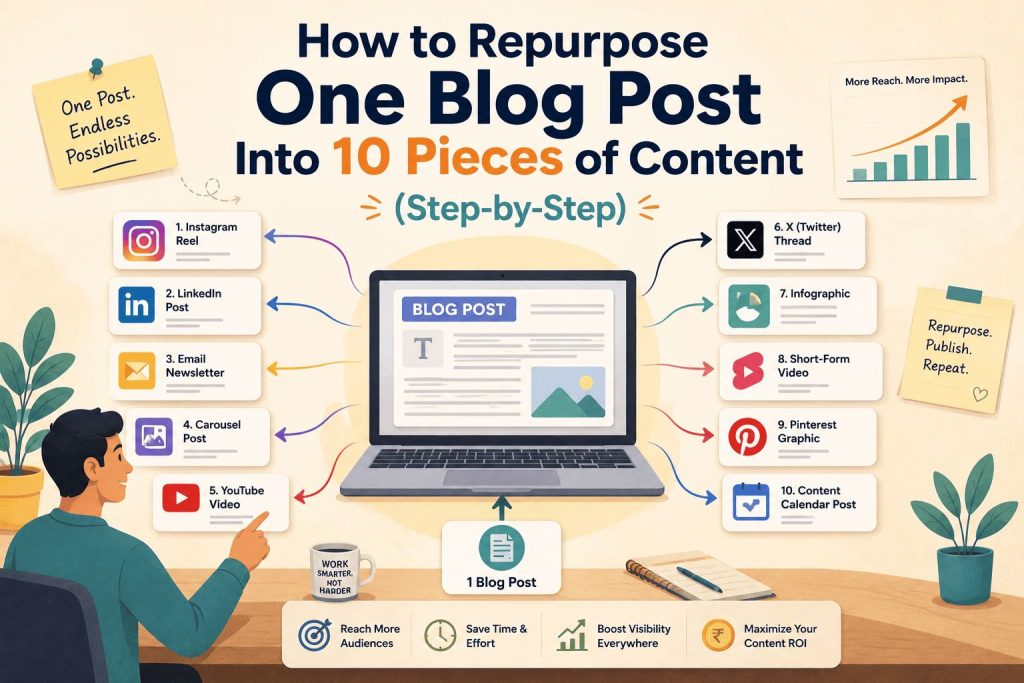
Content repurposing solves this. It’s the practice of taking one well-researched piece of content — like a blog post — and transforming it into multiple formats for different platforms, different audiences, and different consumption habits. Done right, one blog post can fuel 10 distinct pieces of content without you having to start from scratch.
This guide gives you a practical, step-by-step system to do exactly that. You’ll walk away with a clear workflow, a 7-day repurposing plan, and enough clarity to stop treating every publish as a one-time event.
Why Repurposing Is Not “Lazy Marketing”
Before getting into the how, let’s address something that holds a lot of people back.
Many marketers, especially in India where “more content” is still seen as the answer to everything, feel like repurposing is somehow cheating. Like they’re recycling leftovers. They worry their audience will notice they’re posting the same thing again.
This thinking gets content marketing backwards.
Your audience doesn’t see everything you post. On Instagram, organic reach for a regular post is somewhere between 5% and 15% of your followers. That means if you have 2,000 followers, roughly 100 to 300 people saw your last post. The other 1,700 missed it completely.
Add to that the fact that different people consume content differently. Some read long-form blogs in the evening. Others scroll Instagram Reels during their lunch break. Many check LinkedIn on weekday mornings. And a large chunk of Indian audiences — especially in Tier-2 cities — are most active on WhatsApp. If you publish a blog post and only share it as a blog link, you’re reaching only one of those audiences in only one of those moments.
The smartest content creators and brands in the world repurpose relentlessly. A single keynote from a CEO becomes a blog post, a LinkedIn carousel, a podcast episode, a newsletter, and 20 social posts. That’s not laziness — that’s maximizing the return on every piece of content they create.
For Indian solo marketers, freelancers, and small business owners running content without a team, repurposing isn’t optional. It’s how you stay consistent without burning out.
Step 1: Choose the Right Blog Post to Repurpose
Not every blog post is equally repurposable. Before you start breaking things down, you need to pick the right source material.
A blog post worth repurposing usually has one or more of these qualities:
It covers an evergreen topic. Posts about “how to” do something, “what is” something, or “best practices” for something tend to stay relevant for months or even years. A post titled “How to Write Instagram Captions That Drive Engagement” will be just as useful six months from now. A post about a specific news event from last Tuesday won’t be.
It has a how-to, list, or framework structure. These break apart naturally. A post with 7 tips gives you 7 potential content atoms. A post with a 5-step process gives you 5 Reels, 5 carousel slides, and 5 email lines.
It’s already performing or has a strong idea. If a post already gets decent search traffic or your audience has asked about that topic, you know there’s demand. Start there instead of with your newest post.
It answers a question your audience asks repeatedly. The questions your clients, followers, or customers ask in DMs, comments, or meetings are gold. If a blog post answers one of those questions, it’s worth repurposing.
A note on underperforming posts: Don’t skip a post just because it didn’t get traffic when you first published it. Sometimes a strong idea gets buried simply because it wasn’t promoted well. Repurposing gives it a second life in formats where it might perform much better.
Step 2: Break the Post Into “Content Atoms”
This is the most important step — and the one most guides skip entirely.
Before you decide what to create, you need to break your blog post into its smallest useful units. Think of each insight, tip, statistic, framework, analogy, or example in your post as a separate “content atom.” Each atom can stand completely on its own. Each one is the seed of a new piece of content.
Let’s make this concrete with a real example. Take Digital Dawn’s post on How to Start a Dropshipping Business in 2026. Here’s what the content atoms look like when you pull them out:
| Content Atom | What It Is |
|---|---|
| You can start a legitimate dropshipping business in India for ₹5,000–₹10,000 | Surprising fact — great for a hook |
| Step-by-step process to find suppliers | How-to process — great for a carousel |
| Common myths about “zero investment” dropshipping | Myth-busting — great for a Reel |
| Platform comparison: Shopify vs WooCommerce for Indian sellers | Comparison — great for an infographic |
| Real profit margin example | Data-backed — great for a LinkedIn post |
| “What to avoid” section | Warning/cautionary — great for Stories |
That’s six content atoms from a single post. Each one becomes a piece of content formatted for a specific platform. You’re not copy-pasting. You’re adapting the same underlying idea for different formats and audiences.
Spend 15 minutes with any blog post and a blank document. Go section by section and list every standalone idea you find. You’ll rarely come up with fewer than eight to ten atoms from a well-written post.
Step 3: The 10 Content Pieces You Can Create
Now that you have your content atoms, here’s how to turn them into 10 distinct pieces of content.
1. Instagram Carousel Post
What it is: A multi-slide Instagram post, typically 6 to 10 slides, that walks through a concept step by step or shares key takeaways from the blog.
How to create it: Use your blog’s H2 headings as the basis for each slide. Slide 1 is your hook — either a bold question, a surprising stat, or a strong promise. Slides 2 through 8 cover one idea each, written simply and clearly. Final slide is a clear CTA pointing to the full blog post.
Why it works: Carousels consistently get more saves and shares than single-image posts on Instagram, which signals value to the algorithm. They’re also one of the few Instagram formats that people revisit — someone saves a carousel to refer back to it later, bringing you back to the top of their feed.
India-specific tip: Keep the language simple and conversational. Hindi-English code-switching in captions actually performs well for Indian audiences. You don’t need to write in formal English.
Tool: Canva (free). Search “Instagram carousel” in templates. Pick one that matches your brand colours and replace the text.
2. Instagram Reel or YouTube Short
What it is: A 30 to 60 second vertical video built around one content atom from your blog — usually the most surprising, counterintuitive, or useful point.
How to create it: Pick the single most interesting insight from your post. Write a 3-second hook that stops the scroll — something like “Most Indian businesses get this completely wrong…” Record it face-to-camera or use screen capture with a voiceover. Add text overlays for people watching without sound (a significant portion of Indian viewers watch Reels on mute).
Why it works: Reels are currently Instagram’s primary reach driver. A well-made Reel from a blog post can introduce your content to thousands of people who have never visited your website.
What to avoid: Don’t try to summarise the entire blog in one Reel. One idea, communicated clearly, always outperforms a rushed overview of everything.
Tool: CapCut (free, extremely popular in India). It has auto-caption features that save a lot of time.
3. LinkedIn Text Post
What it is: A 150 to 250 word text post that opens with a bold or surprising statement, shares 3 to 5 takeaways, and ends with a question to drive comments.
How to create it: Take one content atom — ideally a counterintuitive insight or a data point that challenges a common assumption. Write it as a short, punchy post. Use line breaks generously because LinkedIn readers skim. Add 3 to 5 bullet points with the core takeaways. End with a question like “What’s been your experience with this?” to get engagement going.
One important formatting note: Put your blog link in the first comment, not in the post body. LinkedIn’s algorithm reduces reach on posts with external links. Post first, then immediately add a comment with the link.
Why it works: LinkedIn is growing fast in India and the audience there — business owners, marketers, founders — is exactly who Digital Dawn wants to reach. A good LinkedIn post from a blog can drive high-quality traffic.
4. Twitter/X Thread
What it is: A connected series of 6 to 10 tweets that breaks your blog post into a tweetable narrative.
How to create it: Tweet 1 is your hook — the strongest claim or most useful outcome from the blog. Tweets 2 through 8 expand on it, one point per tweet. Keep each tweet to one clear idea. Final tweet links back to the full blog with a line like “Read the full breakdown here → [link].”
Why it works: Threads on X consistently get significantly more reach and engagement than single tweets. They also perform well in search, so a well-written thread on a searchable topic can bring ongoing traffic.
5. Email Newsletter
What it is: A short, 150 to 200 word email that teases one valuable insight from the blog and drives subscribers to read the full post.
How to create it: Don’t summarize the entire blog in the email. That defeats the purpose. Instead, pick one compelling insight — a surprising stat, an uncomfortable truth, a quick win — and write it as a short, conversational paragraph. Then end with a clear link: “The full step-by-step breakdown is here → [link].”
Subject line strategy: Use the most interesting or counterintuitive point from the blog as your subject line. “You’re probably wasting 70% of every blog you write” will outperform “New blog post: Content Repurposing Guide” every time.
India-specific angle: WhatsApp newsletters (via WhatsApp Channels or broadcast lists) work even better than email for Indian audiences. A short, friendly WhatsApp message with a link gets far higher open rates than email — often above 70% compared to email’s 20–25%.
6. WhatsApp Broadcast Message
What it is: A short 3 to 4 line message sent to your WhatsApp Business broadcast list summarising the blog’s core idea in plain, conversational language.
How to create it: Write it the way you’d explain the blog post to a friend over WhatsApp. Keep it under 100 words. Include the link. No jargon, no formal language. Something like: “Just published something you might find useful — if you’ve been creating content but not getting results, the problem might be that you’re not repurposing what you already have. Here’s a quick system that takes one blog post and turns it into 10 pieces: [link]”
Why this matters for India: WhatsApp is the primary communication channel for a huge percentage of Indian consumers and businesses. Open rates are dramatically higher than any other channel. Most Indian marketing agencies don’t talk about WhatsApp as a content distribution channel — which means it’s a competitive advantage if you use it well.
7. Infographic
What it is: A vertical visual that condenses the blog’s framework, process, or key statistics into a shareable image.
How to create it: Identify the most visual element of your blog — a step-by-step process, a comparison table, a list of stats, or a decision framework. Build it as a clean infographic in Canva using one of their infographic templates. Keep the text minimal. Let the visuals do the explaining.
Where to use it: Share on Instagram as a static post or as a slide in a carousel. Post on LinkedIn as a document post (PDFs and multi-page documents consistently get high reach on LinkedIn). Pinterest is underused by Indian marketers but delivers long-tail traffic for infographics that answer specific questions.
8. Quote Graphics for Instagram Stories and Facebook
What it is: Simple, visually clean cards that feature one strong sentence or data point from the blog, designed for Instagram Stories or Facebook posts.
How to create it: Pull 2 to 3 strong sentences from the blog — the kind of lines that make someone stop and think. Design them as clean, on-brand cards in Canva. Keep the design minimal: one strong line of text, your brand colours, and your logo. Post as Instagram Stories with a link sticker pointing to the blog.
Why it works: Stories have a different audience from feed posts. Some followers only watch Stories and rarely scroll the feed. Quote cards posted to Stories keep the blog alive for days after publishing with almost no extra effort.
9. Short YouTube or Facebook Video
What it is: A 3 to 5 minute talking-head video where you explain the blog’s main points conversationally — like you’re explaining it to someone in a meeting.
How to create it: You don’t need a script. Read through the blog once, put it aside, and just talk through the main points as if someone asked you about the topic. Record on your phone with good natural light. Upload to YouTube with the same title as the blog for SEO benefit. Embed this video back into the original blog post — it increases the time visitors spend on the page, which is a positive signal for SEO.
Why it matters: YouTube is India’s second-largest search engine. A short, practical video on a searched topic can bring entirely new visitors who would never find you through Google.
10. FAQ or “People Also Ask” Post
What it is: A set of 5 to 8 questions directly related to the blog topic, answered clearly and concisely, formatted as a FAQ section.
How to create it: Search your blog’s main topic on Google. Look at the “People Also Ask” box — those are the exact questions real people are searching for. Pick the ones your blog already answers. Write a short, direct answer to each one (2 to 4 sentences is enough). Add this as a FAQ section at the bottom of the original blog post using those exact questions as subheadings.
Why this is powerful in 2026: FAQ sections formatted this way are one of the most reliable ways to get your content featured in Google’s AI Overviews and the “People Also Ask” snippets. ChatGPT, Perplexity, and Gemini also pull from well-structured, question-and-answer formatted content when answering user queries. This single tactic can significantly increase how often your blog gets cited by AI tools.
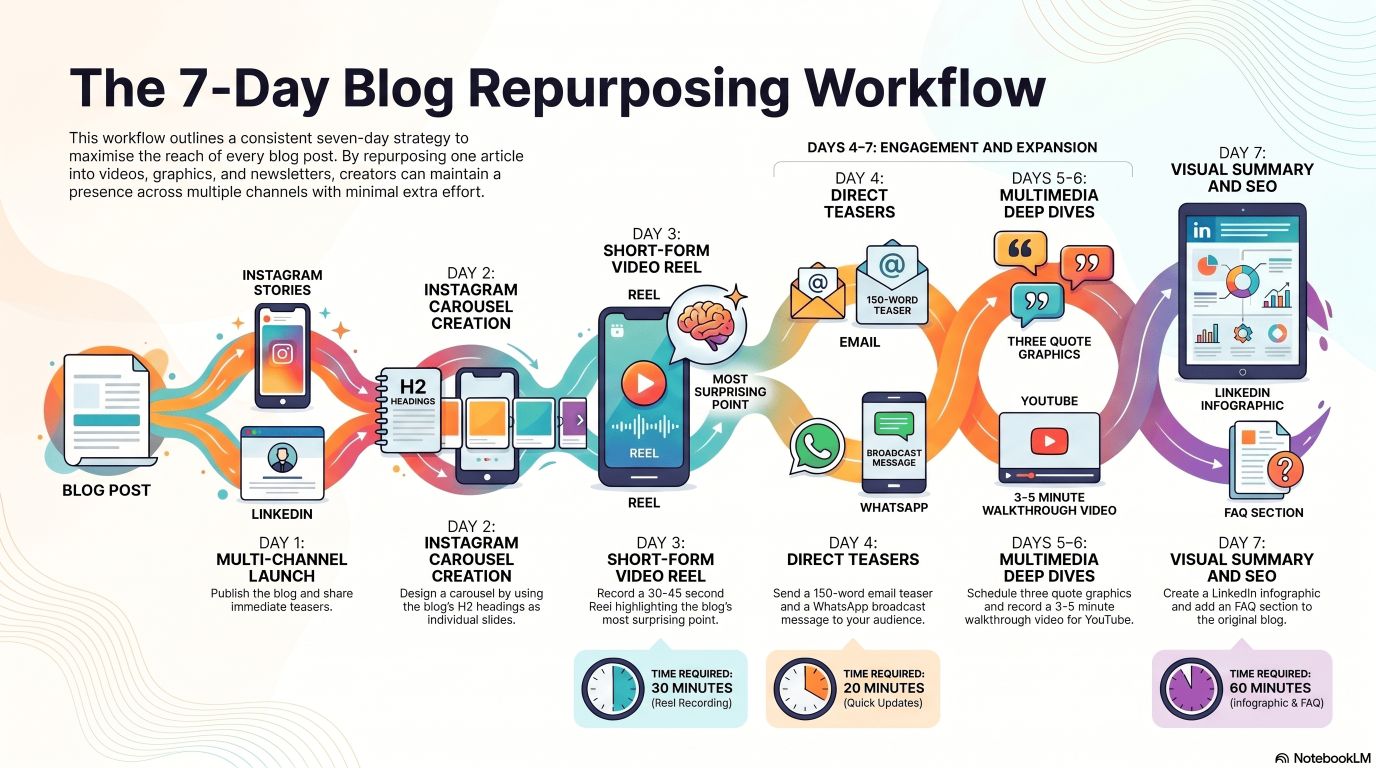
Step 4: The 7-Day Repurposing Workflow
Knowing what to create is one thing. Having a clear workflow is what makes repurposing actually happen consistently. Here’s a simple 7-day plan for every blog post you publish.
| Day | Task | Time Required |
|---|---|---|
| Day 1 | Publish the blog. Share as an Instagram Story with a link sticker. Post the link on LinkedIn with a 2-line teaser. | 20 minutes |
| Day 2 | Create the Instagram carousel using the blog’s H2 headings as slides. Schedule it for the next day. | 45 minutes |
| Day 3 | Record a 30–45 second Reel on the blog’s most surprising point. Post it with the blog link in bio. | 30 minutes |
| Day 4 | Write the email newsletter teaser (150 words max). Send it. Send the WhatsApp broadcast message. | 20 minutes |
| Day 5 | Design 3 quote graphics from the blog’s strongest lines. Schedule as Instagram Stories over the next 3 days. | 25 minutes |
| Day 6 | Record a 3–5 minute YouTube or Facebook video walking through the blog’s key points. Upload with the same blog title. | 45 minutes |
| Day 7 | Build the infographic from the blog’s main process or framework. Post on LinkedIn. Add FAQ section to the original blog. | 60 minutes |
Total time: approximately 4 hours across 7 days.
That’s one blog post turned into 10 pieces of content spread across Instagram, LinkedIn, YouTube, WhatsApp, email, and Google — using content you’ve already written.
Tools You Need (All India-Friendly)
You don’t need expensive software. Here’s what works:
👉 Canva (Free): Design carousels, infographics, and quote graphics. The free plan is more than enough to start. Search for templates by format — “Instagram carousel,” “LinkedIn infographic,” and so on.
👉 CapCut (Free): Edit Reels and short videos on your phone. Extremely popular in India. The auto-caption feature alone saves significant time when adding text overlays to videos.
👉 ChatGPT or Claude (Free or low-cost): Use these to rewrite a blog section as a LinkedIn post, generate caption variations, or write 5 different email subject lines from the same blog. Don’t use AI to write the original content — use it to adapt existing content for different formats.
👉 Buffer or Later (Affordable plans available): Schedule your repurposed content across multiple platforms from one dashboard. Saves the daily login-and-post routine.
👉 WhatsApp Business (Free): Set up a broadcast list for your contacts and clients. This is the most underused distribution channel in Indian digital marketing right now.
👉 Google Docs (Free): Create a simple repurposing checklist document you can duplicate for every blog post. Lists the 10 formats with checkboxes. Takes 5 minutes to set up and saves mental overhead every time you publish.
The One Mistake That Ruins Repurposing
There’s a version of repurposing that doesn’t work — and it’s the version most people accidentally do when they first try this.
Copy-pasting.
Taking a 300-word paragraph from your blog and dumping it into an Instagram caption is not repurposing. It’s lazy, and it performs badly. Blog writing is structured for web reading — long sentences, detailed explanations, flowing paragraphs. Instagram captions need to be short, punchy, and conversational. LinkedIn readers want professional but direct. WhatsApp recipients want casual and brief. YouTube viewers want engaging and energetic.
The rule is simple: adapt for where it’s going, not just what it’s saying.
Every platform has its own language. Rewriting a blog insight for Instagram takes 5 minutes. But those 5 minutes are the difference between content that performs and content that gets ignored.
One Real Example: Start to Finish
Here’s what this looks like end to end, using a real Digital Dawn blog post — “Freelance Digital Marketing Rates in India 2026: What to Actually Charge.”
Content atoms extracted:
- The average freelance content writer in India earns ₹15,000–₹40,000/month
- SEO specialists charge ₹10,000–₹50,000 per project depending on scope
- Most freelancers underprice because they compare themselves to other freelancers, not agencies
- Packaging services into retainers vs. charging per project — which earns more
- Red flags that a client will be a nightmare before you even start
10 pieces created:
- Instagram carousel: “5 Signs You’re Undercharging for Your Digital Marketing Services”
- Reel: “Why freelancers in India stay broke (and how to fix it in 60 seconds)”
- LinkedIn post: A short story about a freelancer who doubled their rate and didn’t lose a single client
- Email newsletter: Teaser of the salary data with a link to the full breakdown
- WhatsApp broadcast: 3 lines + link, friendly tone
- Quote graphic: “Comparing your rate to other freelancers is the fastest way to undervalue yourself.”
- Infographic: Freelance digital marketing rate chart by role and experience level
- Twitter thread: “7 things I wish I knew before pricing my digital marketing services in India”
- YouTube video: 4-minute walkthrough of how to set your freelance pricing structure
- FAQ section added to the original blog: “How much should I charge for SEO in India?”, “Is it better to charge hourly or per project?”, etc.
One blog post. Ten pieces. Three weeks of content. Same audience reached on six different platforms, in six different formats, at six different times of day.
Build It Into Your Workflow, Not Your To-Do List
The reason most people try content repurposing and then quietly stop is that they treat it as a separate project. A bonus task they’ll get to when they have time.
The only way this works long-term is if repurposing is baked into your content publishing process — not added on top of it.
The simplest way to do this: when you sit down to write a blog post, open a second document alongside it titled “Repurposing Plan.” As you write each section, note which sections could become a Reel, which data points would make good quote graphics, and which steps could become a carousel. By the time you finish writing, the repurposing plan is already half done.
Repurposing one blog post into 10 pieces of content is not about working more. It’s about getting more from what you already work hard to create. Your audience is on different platforms. They consume content in different formats. They scroll at different times of day. Your job isn’t to create 10 new ideas every week. It’s to make sure one great idea reaches as many of them as possible.
Start with your best blog post. Break it into atoms. Create three pieces from it this week — not ten. Build the habit, then build the system.
Digital Dawn is a digital marketing agency based in Indore helping Indian businesses grow online through SEO, social media, performance marketing, and content strategy. If you want help building a content repurposing system for your business, get in touch with the team.