Running paid ads without the right tools is like driving with your eyes half shut. You might get somewhere, but you’re burning fuel you didn’t have to — and probably missing the faster route entirely.
In 2026, the gap between marketers who use smart tools and those who don’t has never been wider. Ad costs are rising, platform algorithms are more complex, and attribution has become genuinely tricky since iOS privacy changes reshaped the data landscape. The good news? There are some seriously capable tools available right now that handle the heavy lifting — from campaign automation and audience targeting to cross-platform reporting and conversion tracking.
This guide covers the 10 best performance marketing tools for Meta and Google Ads in 2026. Whether you’re just starting out with your first ad campaign or managing significant monthly budgets across multiple accounts, you’ll find something here that fits your workflow and goals.
What Is a Performance Marketing Tool?
A performance marketing tool is any software that helps you plan, run, optimize, or measure paid advertising campaigns — with the goal of improving your return on ad spend (ROAS). These tools go beyond what native platforms like Meta Ads Manager or Google Ads offer on their own.
Some tools specialize in automation (setting rules that adjust bids or pause underperforming ads automatically). Others focus on attribution (figuring out which ad actually led to a sale). And some do both, while also handling reporting across multiple platforms in one dashboard.
The key difference from general marketing software is the emphasis on measurable outcomes. Performance marketing is about paying for results, and the right tools help you track, prove, and improve those results.
How We Evaluated These Tools
Each tool in this list was assessed across six criteria:
- Ease of use — How quickly can a new user get up and running?
- Meta Ads integration — Depth of features for Facebook and Instagram campaigns
- Google Ads integration — How well it connects with and enhances Google campaigns
- Automation capabilities — What can the tool do on autopilot?
- Reporting and attribution — How clearly does it show what’s working and why?
- Pricing — Is the value proportional to the cost at different budget levels?
Now, let’s get into the tools.
Quick Comparison Table
| Tool | Best For | Meta Ads | Google Ads | Starting Price |
|---|---|---|---|---|
| Meta Ads Manager | All Meta advertisers | ✅ Native | ❌ | Free |
| Google Ads | All Google advertisers | ❌ | ✅ Native | Free |
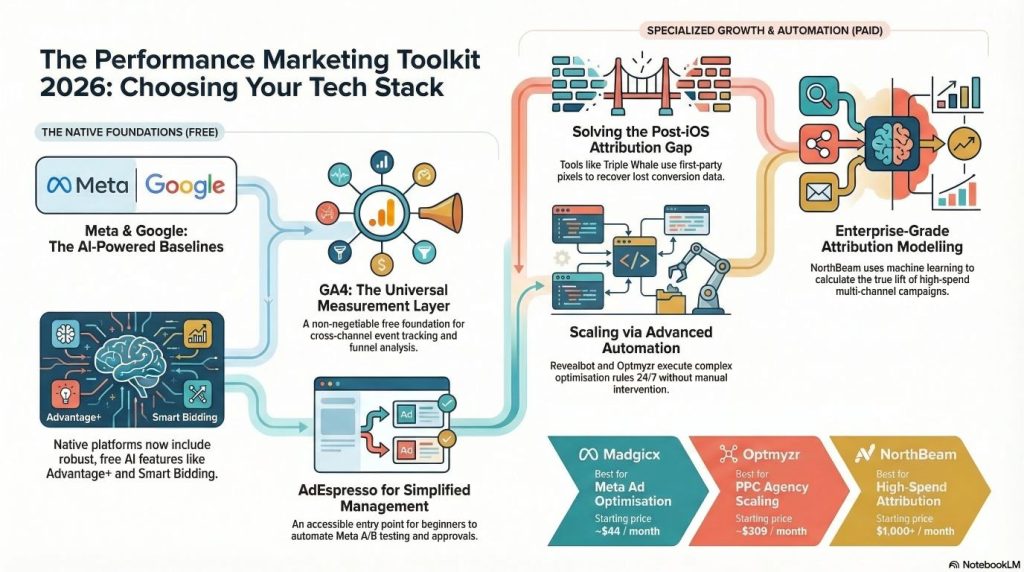
| Madgicx | AI audience optimization | ✅ | ✅ (reporting) | ~$44/month |
| Triple Whale | eCommerce attribution | ✅ | ✅ | $129/month |
| Optmyzr | Google Ads automation | ✅ (limited) | ✅ | $209/month |
| Revealbot (Bïrch) | Rule-based automation | ✅ | ✅ | $99/month |
| AdEspresso | Beginners & A/B testing | ✅ | ✅ | $49/month |
| Supermetrics | Custom reporting & data pipelines | ✅ | ✅ | $39/month |
| NorthBeam | Advanced attribution | ✅ | ✅ | ~$1,000/month |
| Google Analytics 4 | Free cross-channel analytics | ✅ | ✅ Native | Free |
The 10 Best Performance Marketing Tools in 2026
1. Meta Ads Manager
Best for: Anyone running ads on Facebook or Instagram
If you’re advertising on Meta, you already have access to this — and it’s more powerful than most people give it credit for. Meta Ads Manager is the native platform for creating, managing, and analyzing campaigns across Facebook, Instagram, Messenger, and the Audience Network.
The interface has matured a lot. You can build campaigns from scratch, test creative variations, set detailed audience parameters, and monitor results in real time — all without paying for a third-party tool. The customizable columns let you build exactly the view you want, whether you care most about CPM, CTR, CPA, or ROAS.
Recent AI upgrades have also made the platform smarter. Meta’s Advantage+ campaign features can automatically optimize creative, placements, and audiences based on live performance data.
Key Features:
- Full campaign creation and management for all Meta placements
- Audience targeting with custom and lookalike audiences
- Advantage+ AI optimization for creative and placements
- A/B testing built directly into the interface
- Breakdowns by age, gender, placement, device, and more
Pros: Free to use, real-time data, no attribution discrepancies, constantly updated
Cons: Limited cross-channel visibility, can feel overwhelming for beginners
Pricing: Free with any Meta ad account
Who should use it: Every Meta advertiser, as a baseline — even if you add third-party tools later
2. Google Ads
Best for: Anyone running search, display, shopping, or YouTube campaigns
Google Ads is the native platform for running campaigns across Google Search, YouTube, Gmail, the Display Network, and Performance Max campaigns. Like Meta Ads Manager, it’s free to use and gives you direct access to everything Google knows about your campaigns.
What makes Google Ads particularly strong in 2026 is how far its AI-powered features have come. Smart bidding strategies like Target ROAS and Target CPA have become genuinely reliable for accounts with sufficient conversion history. Performance Max campaigns, while less transparent, can drive results across multiple Google surfaces simultaneously.
The keyword planner, audience manager, and conversion tracking tools are robust enough to build a complete campaign strategy without needing additional software — especially for smaller accounts.
Key Features:
- Search, Display, Shopping, YouTube, and Performance Max campaigns
- Smart bidding with Target CPA, Target ROAS, and Maximize Conversions
- Keyword Planner and audience targeting tools
- Conversion tracking and Google Tag integration
- Cross-campaign budget and performance reporting
Pros: Direct platform access, free to use, tight integration with GA4 and Merchant Center
Cons: Steep learning curve for beginners, less visibility into automated decisions
Pricing: Free (you only pay for ad spend)
Who should use it: Any business running paid search or shopping campaigns
3. Madgicx
Best for: eCommerce brands and agencies focused on Meta ad optimization
Madgicx positions itself as a “super app” for Meta advertising — and it earns that description. Where it genuinely shines is in audience intelligence and creative insights. The AI Audiences feature analyzes your existing campaigns and customer data to generate targeting combinations you might never have tested manually, including lookalike segments built from behavioral patterns rather than just past purchasers.
The creative insights dashboard is one of the more useful analytics features you’ll find on any Meta-focused tool. It breaks down ad performance not just by campaign or ad set, but by individual creative elements — helping you understand whether it’s the image, the headline, or the hook that’s actually moving the needle.
It’s also expanded its reporting to include Google Ads data, so you get a cleaner cross-platform view without juggling multiple dashboards.
Key Features:
- AI Audiences — automated audience generation and testing
- Creative Insights dashboard with element-level performance data
- AI Marketer — account audits with specific action recommendations
- Automation Tactics — pre-built optimization rules for bids and budgets
- Cross-channel reporting (Meta + Google)
Pros: Excellent AI audience tools, detailed creative analytics, responsive customer support
Cons: Can feel complex for beginners, some features are overkill for small budgets
Pricing: Starts at ~$44/month (based on ad spend); free trial available
Who should use it: eCommerce businesses and agencies running significant Meta budgets who want AI-driven audience expansion
4. Triple Whale
Best for: Direct-to-consumer (DTC) eCommerce brands on Shopify
If you’re a Shopify-based brand that runs ads on both Meta and Google, Triple Whale was built with you in mind. The platform’s core strength is attribution — specifically, using first-party pixel tracking to capture conversion data that Meta’s native attribution often misses due to iOS privacy restrictions.
The Creative Cockpit is a fan favorite among media buyers. Instead of just showing you which campaigns performed, it tells you exactly which ad variations drove purchases — giving you the creative intelligence to double down on what works and cut what doesn’t.
Triple Whale also calculates blended ROAS across all your marketing channels, which gives you a more honest view of profitability than platform-reported numbers, which are notoriously siloed.
Key Features:
- First-party pixel for accurate post-iOS conversion tracking
- Creative Cockpit for ad-level performance analysis
- Blended ROAS across Meta, Google, and other channels
- Profit tracking including COGS, shipping, and refunds
- Shopify-native integration with real-time revenue data
Pros: Excellent for eCommerce attribution, beautiful dashboard, great Shopify integration
Cons: Primarily built for Shopify; less useful for lead gen or non-eCommerce businesses
Pricing: Starts at $129/month
Who should use it: DTC brands on Shopify spending between $5K–$100K/month on Meta and Google
5. Optmyzr
Best for: PPC agencies and in-house teams managing large Google Ads accounts
Optmyzr is one of the most respected names in Google Ads automation, and it’s earned that reputation by being genuinely useful for day-to-day account management. The platform automates the repetitive, time-consuming tasks that eat up a PPC manager’s week — keyword adjustments, bid changes, quality score monitoring, budget pacing — and packages the rest into a clear priority list of what needs attention.
Teams that use Optmyzr consistently report significant time savings. The platform supports Google, Microsoft, Meta, LinkedIn, and Amazon Ads, making it one of the more versatile tools on this list for multi-channel teams. Its rule-based automation and one-click optimizations mean less manual clicking and more time for actual strategy.
Key Features:
- Rule-based and AI-assisted automation for PPC campaigns
- One-click optimization suggestions across accounts
- Budget management and pacing tools
- Multi-account reporting for agencies
- Support for Google, Microsoft, Meta, LinkedIn, and Amazon Ads
Pros: Deep Google Ads functionality, serious time savings at scale, transparent pricing
Cons: Overkill for small accounts, higher price point than some alternatives
Pricing: Starts at $209/month (billed annually); 14-day free trial available
Who should use it: PPC agencies and in-house teams managing multiple Google Ads accounts
6. Revealbot (now Bïrch)
Best for: Experienced media buyers who want granular automation control
Revealbot — recently rebranded as Bïrch — is the tool of choice for advertisers who have clear, specific optimization rules they want executed automatically. The platform’s rules engine lets you build complex conditional logic: pause ads when CPA exceeds a threshold, increase budgets when ROAS holds above a target for a set number of hours, or shift spend between campaigns based on time-of-day performance.
This isn’t beginner territory. Revealbot rewards marketers who already have an optimization playbook and just need software to execute it 24/7 without requiring constant manual intervention. It supports Meta, Google, and TikTok, which makes it a solid option for teams running multi-platform strategies.
The bulk creation and editing tools are also genuinely impressive. Managing large-scale ad operations — like updating creative across hundreds of ads or duplicating a campaign structure across multiple accounts — is far faster here than through native platforms.
Key Features:
- Advanced rules engine with multi-condition logic and custom metrics
- Bulk ad creation and management across large account structures
- Automated alerts via Slack, email, or webhooks
- Cross-platform automation for Meta, Google, and TikTok
- Reporting and campaign duplication tools
Pros: Highly flexible automation, great for experienced media buyers, good multi-platform support
Cons: Learning curve for new users, pricing scales with ad spend
Pricing: Starts at $99/month (up to $10K ad spend); scales with spend
Who should use it: Experienced media buyers and agencies with established optimization workflows
7. AdEspresso
Best for: Beginners and teams who want simplified Meta ad management
Not every advertiser needs enterprise-level complexity. AdEspresso was built for people who want to run effective Meta ads without navigating the full complexity of Ads Manager — and it does that job well. The platform simplifies campaign creation and makes A/B testing genuinely accessible.
Instead of manually building dozens of ad variations, you select the elements you want to test — headlines, images, audiences, CTAs — and AdEspresso generates the combinations and manages the test automatically. The result analysis is straightforward, surfacing the winners clearly so you know where to put your budget.
It also includes client approval workflows, which makes it a practical choice for small agencies that need their clients to sign off on creative before campaigns go live.
Key Features:
- Simplified campaign creation interface
- Automated A/B test generation and management
- Clear winner analysis and performance reporting
- Client approval and collaboration workflows
- Sync with Google Ads for cross-platform visibility
Pros: Easy to use, great A/B testing tools, client-friendly features
Cons: Less powerful than enterprise tools, limited depth for advanced users
Pricing: Starts at $49/month
Who should use it: Beginners, small business owners, and small agencies managing Meta campaigns
8. Supermetrics
Best for: Analysts and agencies who want to build custom reports in their own tools
Supermetrics doesn’t try to be a dashboard. It does one thing exceptionally well: moving your marketing data from wherever it lives — Meta, Google Ads, LinkedIn, TikTok, GA4, and 100+ other sources — to wherever you want to work with it. That could be Google Sheets, Looker Studio, Excel, BigQuery, or Tableau.
For teams that already have a preferred analysis environment, Supermetrics removes the painful manual export-and-paste workflow that wastes hours every week. You set up your connections once, schedule your data refreshes, and your reports update automatically.
It’s particularly popular with agencies that have built custom reporting templates for clients. Rather than being locked into a vendor’s dashboard layout, you can build exactly the reporting view your clients need and keep it updated without extra effort.
Key Features:
- 100+ platform connectors including Meta, Google, TikTok, and LinkedIn
- Direct integrations with Google Sheets, Excel, Looker Studio, and Power BI
- Data warehouse connections to BigQuery, Snowflake, and others
- Scheduled automatic data refreshes
- No proprietary dashboard — your data, your tools
Pros: Extremely flexible, wide platform support, great for custom reporting
Cons: Doesn’t provide attribution modeling or optimization recommendations on its own
Pricing: Starts at $39/month per connector
Who should use it: Data-driven marketers, analysts, and agencies who prefer building reports in their own tools
9. NorthBeam
Best for: High-spend brands needing advanced multi-touch attribution
NorthBeam is built for advertisers who are spending seriously across multiple channels and need to understand how those channels actually interact with each other. Its machine learning-based attribution goes well beyond last-click or first-click models, incorporating media mix modeling to estimate the true contribution of each marketing touchpoint — even when direct tracking isn’t possible.
One of its most valuable capabilities is showing how your Meta ads influence Google search behavior, or how upper-funnel activity affects direct traffic. For brands managing significant budgets across Meta, Google, TikTok, and other channels simultaneously, this kind of cross-channel visibility is essential for making smart allocation decisions.
It’s not for everyone — the price point reflects the sophistication of the platform, and the models work best with substantial historical data. But for the brands it’s designed for, NorthBeam provides attribution clarity that’s genuinely hard to find elsewhere.
Key Features:
- ML-based multi-touch attribution modeling
- Media mix modeling across paid, organic, and offline channels
- Cross-device tracking for complete customer journey visibility
- Incrementality testing to measure true ad lift
- Unified cross-channel performance dashboard
Pros: Best-in-class attribution for high-spend brands, cross-channel insights, incrementality testing
Cons: Expensive, requires significant data volume to deliver accurate models
Pricing: Custom pricing, typically starting around $1,000+/month
Who should use it: Established brands spending $50K+ monthly across multiple advertising channels
10. Google Analytics 4 (GA4)
Best for: Any business that wants free, reliable cross-channel analytics
GA4 is the foundation of any solid measurement setup — and the fact that it’s free makes it non-negotiable. As Google’s current analytics platform, it offers event-based tracking, attribution modeling, and native integration with both Google Ads and Search Console. It also connects with Meta through the GA4 data import feature, giving you a cross-channel view of traffic and conversion behavior.
For businesses that aren’t ready to invest in paid attribution tools, GA4 does a surprisingly solid job of connecting ad activity to website behavior and conversions. The exploration reports let you dig into user journeys, funnel analysis, and audience segments in ways that the old Universal Analytics never supported.
It’s not perfect — the interface has a learning curve and the attribution models have limitations — but as a free foundation that integrates directly into your Google Ads campaigns, it’s indispensable.
Key Features:
- Event-based tracking with flexible conversion definitions
- Attribution modeling with multiple model options
- Native Google Ads integration for closed-loop reporting
- Audience building and remarketing list creation
- Exploration reports for funnel and path analysis
Pros: Free, deep Google ecosystem integration, powerful exploration tools
Cons: Steep learning curve, limited native Meta attribution
Pricing: Free (GA4 360 enterprise version available for larger organizations)
Who should use it: Every business running ads — this should be the baseline analytics layer for all of them
How to Choose the Right Tool for Your Situation
With ten solid options on the table, the right choice really comes down to four things.
Your budget: If you’re spending less than $5K/month on ads, starting with the native platforms (Meta Ads Manager, Google Ads, GA4) and adding AdEspresso or Madgicx’s entry-level plan is a reasonable stack. Advanced tools like NorthBeam only make sense once your ad spend is large enough that even small efficiency gains cover the tool cost.
Your primary platform: If you’re mostly running Meta campaigns, tools like Madgicx or Revealbot are a better fit than Optmyzr, which is more Google-focused. If Google Ads is your main channel, Optmyzr stands out clearly. If you’re splitting budget across both, look for tools with genuine support for both platforms (Triple Whale, Supermetrics, GA4).
Your experience level: Beginners will get more value from simpler tools like AdEspresso. Advanced media buyers who want to encode their own optimization logic will appreciate the flexibility of Revealbot. Data teams who want to work in their own environment should go with Supermetrics.
Your business model: eCommerce brands — especially on Shopify — should look hard at Triple Whale for attribution. Lead gen businesses don’t need the same Shopify-specific features and may be better served by GA4 + Optmyzr or GA4 + Madgicx.
Final Thoughts
There’s no single best tool — there’s the best tool for where you are right now. If you’re starting out, the native platforms plus GA4 give you a solid foundation at zero cost. As your campaigns grow in complexity, layering in a dedicated optimization or attribution tool can meaningfully improve your results.
The tools in this list represent the strongest options available in 2026 across different use cases, budgets, and experience levels. Start by identifying your biggest pain point — whether that’s wasted ad spend, unclear attribution, time-consuming manual management, or lack of reporting depth — and pick the tool that addresses it most directly.
Once you find your fit, the rest gets easier.
If you looking for performance marketing services, please do check out this page here – Performance Marketing Services
Last updated: March 2026