
The ₹41,50,000 Design Tool Trap That’s Bleeding Small Businesses Dry
You’re probably making the same expensive mistake that 73% of small businesses make when choosing design software. While Adobe Creative Suite sits unused on countless computers, costing businesses an average of ₹99,600 annually per license, entrepreneurs are throwing money at tools they don’t actually need.
The truth? Most businesses are either overpaying for professional-grade software they’ll never master, or underpaying for basic tools that limit their growth potential. This isn’t just about choosing between Canva and Adobe – it’s about understanding what your business actually needs versus what marketing campaigns tell you to buy.
The Real Cost of Poor Design Tool Decisions
Before we dive into the Canva vs Adobe debate, let’s talk numbers that matter to your bottom line:
The Hidden Costs:
- Average time wasted learning complex software: 47 hours per employee annually
- Unused features in enterprise software: 68% of paid features go untouched
- Design project delays due to tool complexity: 3.2 weeks average delay
- Employee frustration leading to productivity loss: 23% decrease in creative output
Market Reality Check:
- Adobe Creative Cloud subscriptions: ₹4,400/month per user for complete suite
- Canva Pro subscriptions: ₹1,200/month per user for business features
- Average small business design budget: ₹2,00,000 annually
- ROI on proper tool selection: 340% increase in design efficiency
Adobe Creative Suite: The Professional Powerhouse
Let’s start with the elephant in the room – Adobe Creative Suite remains the industry gold standard for professional design work, and there are solid reasons why creative agencies worldwide swear by it.
What Adobe Does Best
Unmatched Professional Capabilities: Adobe’s ecosystem offers depth that no other platform can match. Photoshop’s advanced photo manipulation, Illustrator’s vector precision, and InDesign’s typography controls represent decades of software refinement. When you need pixel-perfect control, advanced color management, or complex multi-layer compositions, Adobe delivers tools that simply don’t exist elsewhere.
Industry Integration: Adobe products integrate seamlessly with professional workflows. Print shops expect Adobe files. Marketing agencies collaborate through Adobe Creative Cloud. Freelance designers build their portfolios using Adobe standards. This ecosystem lock-in creates real business value for companies operating in professional creative environments.
Advanced Features That Matter:
- Non-destructive editing capabilities in Photoshop
- Professional color management across all applications
- Advanced typography controls in InDesign
- 3D design capabilities in Illustrator and Photoshop
- Video editing integration with Premiere Pro and After Effects
The Adobe Reality Check
Here’s where Adobe becomes problematic for most businesses: you’re paying for Formula 1 performance when you need a reliable daily driver.
Who Should Use Adobe:
- Graphic design agencies handling client work
- E-commerce businesses with extensive product photography needs
- Companies producing print materials requiring precise color matching
- Businesses with dedicated creative teams
- Organizations needing advanced video editing capabilities
The Adobe Trap: Most small businesses subscribe to Adobe Creative Cloud believing they need “professional tools,” then use maybe 5% of the available features. You’re essentially paying ₹52,800 annually for software that could be replaced by free alternatives for 90% of your actual use cases.
Canva: The Business-Friendly Alternative
Canva has revolutionized design accessibility, but it’s not just a “simple” alternative – it’s a fundamentally different approach to business design needs.
Why Canva Works for Most Businesses
Speed and Efficiency: Canva’s template-driven approach means you can create professional-looking designs in minutes rather than hours. For businesses that need consistent, branded content quickly, this efficiency translates directly to cost savings. A social media manager can produce a week’s worth of posts in the time it would take to set up a single Adobe Illustrator file.
Built-in Business Intelligence: Canva understands business needs in ways Adobe doesn’t. The platform includes:
- Brand kit integration for consistent company branding
- Team collaboration tools designed for non-designers
- Resize functionality that maintains design integrity across platforms
- Content scheduling that connects directly to social media
- Stock photo integration with built-in licensing
The Learning Curve Advantage: While Adobe requires months of training to achieve proficiency, most users become productive in Canva within hours. This matters enormously for small businesses where the marketing manager, office administrator, or business owner themselves handle design tasks.
Canva’s Business-Smart Features
Template Intelligence: Canva’s templates aren’t just pretty pictures – they’re based on conversion data and design psychology. The platform analyzes which designs perform best and incorporates those insights into template creation. This means even non-designers can create materials that follow proven design principles.
Multi-Format Efficiency: Create one design and instantly resize it for Facebook posts, Instagram stories, LinkedIn banners, and print flyers. This functionality alone saves businesses hours of reformatting work that would require separate projects in Adobe applications.
Collaboration Without Complexity: Teams can review, comment, and approve designs without needing Adobe software or design knowledge. Version control happens automatically, eliminating the file management headaches that plague Adobe workflows.
The Financial Reality: What You’re Actually Spending
Let’s break down the real costs beyond subscription fees:
Adobe Total Cost of Ownership
Direct Costs:
- Creative Cloud Complete: ₹52,800/year per user
- Additional storage: ₹10,000/year average
- Plugin subscriptions: ₹16,600/year average
- Total Direct Cost: ₹79,400/year per user
Hidden Costs:
- Training and onboarding: ₹66,400 per employee
- Productivity loss during learning curve: ₹1,00,000 estimated value
- Technical support and troubleshooting: ₹25,000/year
- Hardware upgrades required: ₹33,200/year average
- Total Hidden Cost: ₹2,24,600 first year, ₹58,200 annually thereafter
Real Adobe Cost: ₹3,04,000 first year, ₹1,37,600 annually per user
Canva Total Cost of Ownership
Direct Costs:
- Canva Pro: ₹14,950/year per user (when billed annually)
- Additional team features: ₹5,000/year average
- Total Direct Cost: ₹19,950/year per user
Hidden Costs:
- Training and onboarding: ₹4,150 per employee
- Learning curve productivity impact: ₹8,300 estimated
- Technical support needs: Minimal (built-in help)
- Hardware requirements: Uses existing equipment
- Total Hidden Cost: ₹12,450 first year, minimal ongoing
Real Canva Cost: ₹32,400 first year, ₹19,950 annually per user
The Performance Comparison: Where Each Tool Excels
Design Quality and Professional Output
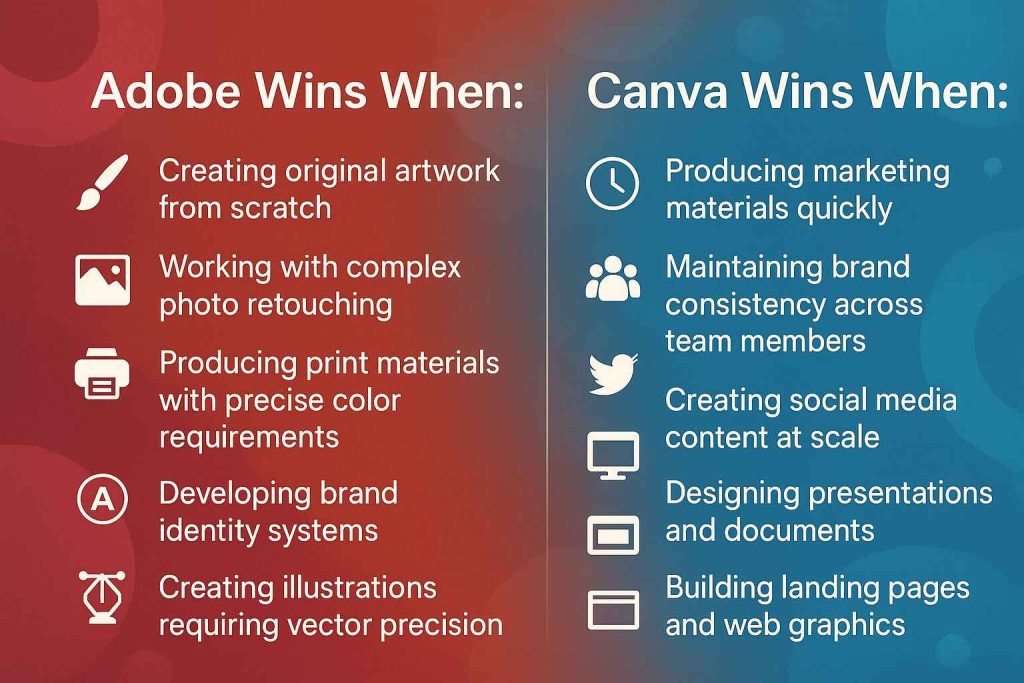
Adobe Wins When:
- Creating original artwork from scratch
- Working with complex photo retouching
- Producing print materials with precise color requirements
- Developing brand identity systems
- Creating illustrations requiring vector precision
Canva Wins When:
- Producing marketing materials quickly
- Maintaining brand consistency across team members
- Creating social media content at scale
- Designing presentations and documents
- Building landing pages and web graphics
Productivity and Time-to-Market
Recent studies show dramatic differences in production speed:
Social Media Post Creation:
- Adobe: 45 minutes average (including setup time)
- Canva: 8 minutes average
Marketing Flyer Design:
- Adobe: 2.5 hours for non-designers, 45 minutes for professionals
- Canva: 15 minutes for anyone
Brand Consistency Across Materials:
- Adobe: Requires style guides, training, and careful file management
- Canva: Built-in brand kits ensure automatic consistency
The Hybrid Approach: Why Smart Businesses Use Both
The most successful businesses don’t choose between Canva and Adobe – they use each tool for its intended purpose.
Strategic Tool Allocation
Use Adobe For:
- Logo design and brand identity creation (one-time investment)
- Professional photography retouching
- Complex illustrations or artwork
- Print materials requiring precise color matching
- Video content requiring advanced editing
Use Canva For:
- Daily social media content
- Marketing materials and flyers
- Presentations and documents
- Website graphics and banners
- Email marketing designs
- Quick promotional materials
Cost-Effective Implementation Strategy
Instead of subscribing to full Adobe Creative Cloud for every team member:
- Purchase Adobe subscriptions for 1-2 key creative roles
- Use Canva Pro for all other team members
- Create templates in Adobe, execute daily work in Canva
- Maintain brand consistency through shared asset libraries
This hybrid approach typically reduces design software costs by 60% while maintaining professional capabilities where needed.
Common Mistakes That Waste Money and Time
The “Professional Tools” Fallacy
Many businesses subscribe to Adobe Creative Cloud believing that more expensive tools automatically produce better results. Reality check: design quality depends far more on understanding design principles, knowing your audience, and maintaining consistency than on software capabilities.
The Instagram Test: Can you tell which social media posts were created in Canva versus Adobe just by looking? Usually not. Your customers certainly can’t, and they definitely don’t care what software you used if the design effectively communicates your message.
The “We Might Need It Someday” Trap
Businesses often pay for Adobe subscriptions “just in case” they need advanced features someday. This is like buying a commercial kitchen because you might want to cater an event eventually. The smart approach is starting with tools that meet your current needs and upgrading when specific requirements justify the investment.
Ignoring Team Capabilities
Adobe Creative Suite requires significant design knowledge to produce professional results. Many businesses pay for Adobe subscriptions then struggle with poor-quality output because team members lack the skills to leverage advanced features effectively. Canva’s guided approach often produces better results for non-designer team members.
Industry-Specific Recommendations
E-commerce Businesses
- Product Photography: Adobe Photoshop for complex retouching, Canva for quick lifestyle shots and social content
- Marketing Materials: Canva for most promotional content, Adobe for packaging design
- Budget Split: 70% Canva, 30% Adobe
Service-Based Businesses
- Marketing Collateral: Canva handles 90% of needs effectively
- Brand Identity: Adobe for initial logo/brand development, Canva for ongoing implementation
- Budget Split: 85% Canva, 15% Adobe
Content Marketing Agencies
- Client Deliverables: Adobe for high-end creative work, Canva for volume content production
- Internal Operations: Canva for proposals, presentations, internal communications
- Budget Split: 60% Adobe, 40% Canva
Manufacturing and B2B Companies
- Technical Documentation: Adobe for complex diagrams and technical illustrations
- Marketing and Sales Materials: Canva for presentations, trade show materials, social content
- Budget Split: 40% Adobe, 60% Canva
The Future of Design Tools: What’s Coming Next
The design software landscape continues evolving rapidly, with AI integration and cloud collaboration changing how businesses approach creative work.
AI-Powered Design Assistance
Both Canva and Adobe are integrating AI capabilities, but with different focuses:
Canva’s AI Direction:
- Automated design suggestions based on content
- Smart cropping and layout optimization
- Voice-to-design functionality for quick concept creation
- Predictive template recommendations
Adobe’s AI Integration:
- Advanced photo manipulation through AI
- Automated complex editing tasks
- Intelligent object removal and background replacement
- AI-assisted vector creation
Cloud Collaboration Evolution
Remote work has accelerated demand for cloud-based creative collaboration. Canva built this into their platform from the beginning, while Adobe has been retrofitting their desktop applications for cloud collaboration.
Current Collaboration Capabilities:
- Canva: Real-time editing, comment systems, approval workflows built-in
- Adobe: Creative Cloud sharing, but still primarily desktop-based workflows
Making the Right Choice for Your Business
The decision between Canva and Adobe shouldn’t be based on what other businesses use or what seems more “professional.” It should be based on your specific needs, team capabilities, and budget constraints.
Decision Framework
Choose Adobe If:
- You have dedicated creative professionals on staff
- Your industry requires precise color matching and print production
- You regularly create original illustrations or complex photo manipulations
- Your budget can absorb ₹1,25,000+ annually per creative team member
- You have time for extensive training and software mastery
Choose Canva If:
- Your team includes non-designers who create marketing materials
- You need to produce content quickly and consistently
- Brand consistency across team members is a priority
- Your budget is under ₹41,500 annually per user for design software
- You want results immediately without extensive learning curves
Choose Both If:
- You have varied design needs requiring both professional and quick-turnaround capabilities
- Your budget allows for strategic tool allocation
- You want to maintain professional capabilities while maximizing team productivity
- You can clearly define use cases for each platform
The Bottom Line: Stop Wasting Money on the Wrong Tools
The design software decision isn’t about choosing the “best” tool – it’s about choosing the right tool for your specific business needs. Adobe Creative Suite offers unmatched professional capabilities, but most businesses pay for complexity they don’t need. Canva provides business-focused efficiency that often produces better results for typical marketing and communication needs.
Smart businesses audit their actual design requirements, evaluate team capabilities, and choose tools strategically rather than following industry assumptions. Whether that means switching from Adobe to Canva, upgrading from Canva to Adobe, or implementing a hybrid approach depends on your specific situation.
The companies thriving in today’s competitive landscape are those that optimize every business decision – including design software selection – for maximum efficiency and results rather than maximum features.
Ready to optimize your design workflow and stop wasting money on the wrong tools?
At Digital Dawn, we help businesses make smart technology decisions that improve productivity while reducing costs. From design software selection to complete digital marketing strategies, we ensure your tools serve your business goals rather than draining your budget.
Get Started Today:
- Call/WhatsApp: +91-9644940497
- Email: digitaldawnin@gmail.com
- Free Consultation: Available for businesses ready to optimize their creative workflows