
If you’re running an online store in India, you’ve probably noticed how Google Shopping ads show up right when someone searches for a product. Those image-rich listings at the top of search results? They’re not magic. They’re Shopping ads, and they can seriously boost your sales if you know how to use them right.
Here’s the thing: Indian e-commerce is growing at 19.13% annually and smartphones account for 78% of all online purchases. Competition is getting tougher every day. That’s where Shopping ads come in. Unlike regular text ads, these show your actual products with images, prices, and store names before anyone even clicks.
This guide will walk you through everything you need to know about optimizing Google Shopping ads specifically for the Indian market. Whether you’re selling electronics in Bangalore or fashion in Mumbai, these strategies will help you get better results without wasting ad spend.
Key Takeaways:
- Shopping ads generate 76.4% of retail search ad spending in the US market, with similar trends emerging in India
- Indian e-commerce grows at 19.13% annually, reaching $136 billion in 2025
- Mobile devices drive 78% of online purchases in India
- Average CPC for Shopping ads in India: ₹24 (compared to ₹20-150 for search ads)
- Businesses typically see 2:1 to 4:1 ROAS on well-optimized Shopping campaigns
Why Google Shopping Ads Matter for Indian Businesses
Shopping ads work differently from regular search ads. When someone searches for “red running shoes,” they see actual products immediately. No guessing, no clicking through to find out what you’re selling. The product, price, and image are right there.
For Indian businesses, this is huge. Shopping ads drive 85.3% of all clicks on Google Ads campaigns and account for 76.4% of retail search ad spending. Indian shoppers love seeing what they’re getting before they click, especially when they’re comparing prices across different sellers.
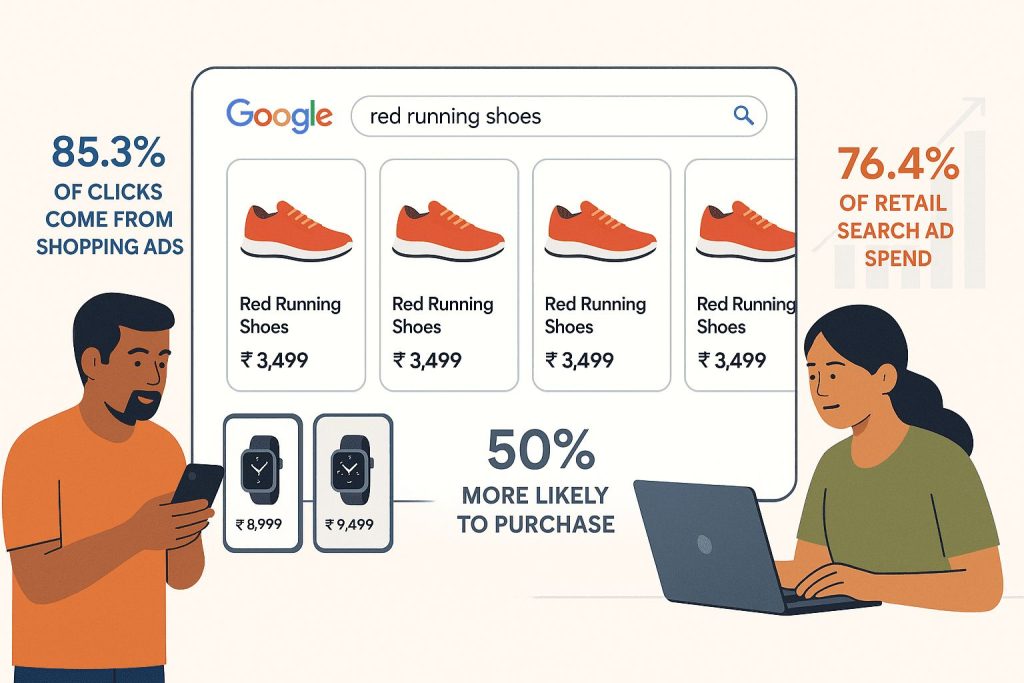
Plus, Shopping ads tend to bring in people who are ready to buy. People who click on Google Shopping ads are 50% more likely to purchase compared to those clicking organic listings. Someone searching for “buy iPhone 15 128GB” isn’t just browsing—they’re close to making a purchase decision.
Setting Up Your Google Merchant Center Account
Before you can run Shopping ads, you need a Google Merchant Center account. Think of it as a home for your product data that connects to Google Ads.
Here’s what you need to do:
First, go to Google Merchant Center and create an account. You’ll need to verify your website ownership (Google will guide you through this). Then, set up your business information including your store name, address, and contact details.
Make sure your website meets Google’s requirements. You need clear return and refund policies, secure checkout, and accurate contact information. Indian businesses sometimes skip these details, but Google checks them carefully.
Link your Merchant Center account to your Google Ads account. This connection lets you create campaigns and track performance in one place.
Building a Strong Product Feed
Your product feed is the backbone of Shopping ads. It’s basically a spreadsheet that tells Google everything about your products. Get this right, and you’re halfway to success.
Essential product feed attributes include:
Product title: This is critical. Include brand name, product type, key features, and specifications. For example: “Samsung Galaxy S24 5G (8GB RAM, 128GB Storage) Phantom Black” works better than just “Samsung Phone”
Product description: Write detailed descriptions that highlight benefits and features. Include keywords naturally, but don’t stuff them in awkwardly
Images: Use high-quality images with white or neutral backgrounds. Google recommends at least 800 x 800 pixels, but higher resolution looks better on mobile devices
Price and availability: Keep these updated constantly. Nothing frustrates shoppers more than clicking on a product that’s out of stock or mispriced
GTIN (Global Trade Item Number): Include barcodes when possible. This helps Google match your products correctly and can improve ad performance
Product category: Choose the most specific Google product category available. Don’t just pick “Apparel & Accessories” when you can choose “Apparel & Accessories > Clothing > Shirts”
For Indian brands selling in multiple languages, you can create feeds in Hindi, Tamil, or other regional languages. This helps you reach customers who prefer shopping in their native language.
Optimizing Product Titles and Descriptions
Product titles are probably the most important part of your feed. Google uses them to match your ads to search queries.
Follow this title structure for best results:
Brand + Product Type + Key Attributes + Size/Variant + Color
Example: “Titan Analog Watch for Men (Black Dial, Leather Strap, Water Resistant)”
Put the most important information first. If brand matters in your category, lead with it. If you’re selling generic products, start with the product type.
Avoid promotional language in titles. Words like “sale,” “discount,” or “free shipping” aren’t allowed. Save those for your ad descriptions and promotions.
Keep descriptions between 500-1000 characters. Include relevant keywords but write for humans, not algorithms. Mention materials, dimensions, use cases, and anything that helps shoppers make decisions.
Managing Bids and Budgets Effectively
Shopping campaigns work on a cost-per-click model. You pay when someone clicks your ad. The trick is bidding smart so you get clicks from people who’ll actually buy.
Start with manual bidding if you’re new to Shopping ads. This gives you control while you learn what works. Set different bids for different products based on their profit margins and how well they sell.
Here’s a simple bidding strategy:
- High-margin, popular products: Bid higher to get more visibility
- Low-margin products: Bid conservatively to protect profits
- New products: Test with moderate bids, then adjust based on performance
- Seasonal items: Increase bids before peak seasons (think Diwali, wedding season, back to school)
For Indian e-commerce, consider that mobile traffic is massive. Smartphones drive 78% of online purchases, with approximately 73% of internet users preferring content in Indian languages. Make sure your bids account for mobile shoppers and consider creating product feeds in regional languages like Hindi, Tamil, or Bengali to reach broader audiences.
Once you have conversion data, switch to Smart Bidding. Google’s automated strategies like Target ROAS (Return on Ad Spend) or Maximize Conversion Value can optimize bids better than manual adjustments, especially when managing large product catalogs.
Using Campaign Priority and Negative Keywords
Campaign priority is a feature that lets you control which campaign shows ads when products exist in multiple campaigns. You can set priority as low, medium, or high.
Here’s a practical way to use this:
Create three campaigns for the same products:
- High priority campaign (low bids): Catches all traffic initially
- Medium priority campaign (medium bids): Uses negative keywords to exclude generic searches
- Low priority campaign (high bids): Targets only your best-converting search terms
This structure helps you control costs while maximizing conversions.
Negative keywords are essential in Shopping campaigns. Unlike search campaigns, you can’t choose which keywords trigger your ads. Google matches them automatically. Negative keywords let you exclude irrelevant searches.
Add “free,” “DIY,” “job,” “how to,” “repair,” and other terms that indicate someone isn’t looking to buy. If you sell premium products, add “cheap” and “discount” as negatives.
Check your search terms report weekly and add new negative keywords regularly. This stops your ads from showing for irrelevant searches and saves money.
Product Segmentation Strategies
Don’t lump all your products into one campaign. Segment them so you can optimize each group differently.
Segment products by:
- Performance: Create separate campaigns for best sellers vs. slow movers. Give your winners more budget and visibility
- Profit margin: Products with 40% margins can afford higher bids than products with 15% margins
- Price range: Budget products often need different strategies than premium items
- Category: Electronics need different approaches than clothing or home goods
- Brand: If you sell multiple brands, separate them. Some brands convert better and deserve higher bids
- Seasonality: Create campaigns specifically for seasonal products. Pause them in off-seasons to avoid wasting budget
Segmentation takes time to set up, but it pays off. You can optimize bids, budgets, and strategies for each product group instead of treating everything the same.
Mobile Optimization for Indian Shoppers
Mobile shopping in India is exploding. Most of your customers will see your ads on phones, not computers.
Make sure your product images look good on small screens. Test how they appear on different devices. Blurry or unclear images kill conversions on mobile.
Your landing pages need to load fast. Indian internet speeds vary widely. If your page takes more than 3 seconds to load, you’ll lose customers. Compress images, minimize code, and use a good hosting provider. With India’s average mobile data priced at just ₹13.5 per GB, users expect fast, smooth experiences despite affordable connectivity.
Make checkout simple. Long forms and complicated processes frustrate mobile shoppers. Enable guest checkout, support digital wallets like Paytm and PhonePe, and minimize the steps from product page to purchase.
Consider mobile-specific promotions. “App only” deals or “mobile exclusive” discounts can drive more mobile conversions.
Leveraging Google Shopping Promotions
Shopping promotions let you highlight special offers directly in your ads. A “20% off” badge next to your product catches attention and improves click-through rates.
You can run promotions for:
- Percentage discounts
- Money-off deals
- Free shipping offers
- Free gifts with purchase
- Cashback offers
Set up promotions in your Merchant Center account. You’ll need to follow Google’s guidelines carefully. Make sure the promotion is clearly visible on your landing page, and the terms match exactly what you promised in the ad.
Time promotions around key shopping periods in India. Diwali, New Year, Independence Day, Republic Day, and festival seasons are when people are actively looking for deals.
Free shipping promotions work particularly well. Many Indian shoppers abandon carts when they see unexpected shipping charges. Highlighting free shipping in your ads can significantly boost conversions.
Tracking and Measuring Performance
You can’t optimize what you don’t measure. Set up conversion tracking properly from day one.
Install the Google Ads conversion tracking tag on your thank you page. This tells Google when someone completes a purchase. Without this data, you’re flying blind.
Track these key metrics:
- Click-through rate (CTR): Shows how appealing your ads are. Low CTR means your images, titles, or prices need work
- Conversion rate: Percentage of clicks that turn into sales. Low conversion rates often point to landing page issues or pricing problems
- Cost per conversion: How much you spend to get one sale. Compare this to your profit margins
- Return on ad spend (ROAS): Revenue generated for every rupee spent on ads. If you spend ₹1,000 and make ₹4,000, your ROAS is 4x or 400%
- Impression share: Percentage of times your ads showed versus how many times they could have shown. Low impression share means you’re missing opportunities
Set up Google Analytics to see what happens after people click your ads. Do they browse other products? Where do they drop off? This information helps you improve your website, not just your ads.
Handling Common Issues with Product Feeds
Product feed errors are frustrating but common. Google will disapprove products that don’t meet their requirements.
Common issues include:
- Missing required attributes: Double-check that every product has title, description, link, image link, price, and availability
- Image problems: Images must meet size requirements and show the actual product, not logos or promotional graphics
- Landing page issues: The product on your landing page must match the product in your feed. Price and availability must be consistent
- Policy violations: Make sure you’re not selling prohibited items or making restricted claims
Check your Merchant Center diagnostics tab regularly. Google tells you exactly what’s wrong and how to fix it. Don’t ignore these warnings or your products won’t show.
Use a feed management tool if you have a large inventory. Tools like DataFeedWatch or GoDataFeed can automate updates and catch errors before they cause problems.
Competitive Pricing Strategies
Price matters a lot in Shopping ads. Google often shows multiple sellers for the same product, and shoppers compare instantly.
You don’t always need the lowest price, but you need to be competitive. Monitor what competitors charge for similar products. Tools like Price2Spy or competitor monitoring features in shopping management platforms can help.
If you can’t compete on price alone, highlight other value propositions. Fast delivery, better warranty, authentic guarantees, or superior customer service can justify slightly higher prices.
Consider dynamic pricing strategies. Adjust prices based on demand, competition, and inventory levels. Many Indian e-commerce brands successfully use this approach, especially for electronics and fashion.
Bundle products to create unique offerings that competitors can’t easily match. A phone case sold with a screen protector at a package price might perform better than each item sold separately.
Scaling Your Shopping Campaigns
Once you’ve got the basics working, it’s time to scale up.
Expand your product catalog gradually. Don’t dump 10,000 products into campaigns at once. Add new products in batches, monitor performance, and optimize before adding more.
Test new product categories carefully. What works for electronics might not work for clothing. Start small, learn what works, then scale.
Consider expanding to different geographic areas within India. If you’re successful in metro cities, test tier-2 and tier-3 cities. Shopping behavior and competition levels vary across regions.
Increase budgets on campaigns that are already profitable. If a campaign consistently delivers 3x ROAS, give it more budget to capture additional sales.
Experiment with Smart Shopping campaigns once you have consistent conversion data. These campaigns use machine learning to optimize across search, display, YouTube, and Gmail automatically. They can help you scale faster with less manual work.
Real Success Story: How an Indian Fashion Brand Achieved 13x ROAS
Let me share a real example that shows what’s possible with well-optimized Shopping campaigns in India.
A women’s fashion brand selling ethnic and contemporary wear was stuck. They were getting organic traffic but couldn’t scale profitably. Their average order value was around ₹1,500, and they were spending money on ads without seeing strong returns.
⚠️The Challenge:
The brand had basic Shopping campaigns running, but they weren’t properly structured. Their product feed was messy, they weren’t using any audience signals, and their campaigns treated all products the same way. They were getting clicks but conversions were disappointing.
⚡What Changed:
- The brand restructured their entire Shopping approach. They migrated from basic Smart Shopping to Performance Max campaigns. They segmented their product feed by category (kurtas, dresses, co-ords), occasion (festive, casual, daily wear), and price range.
- They created different campaigns for different stages of the customer journey. Top-of-funnel campaigns targeted interest-based audiences like “ethnic wear buyers” and “festival shopping.” Middle-funnel campaigns remarketed to website visitors. Bottom-funnel campaigns focused on people who abandoned carts.
- They also fixed their product titles. Instead of “Blue Kurta,” they wrote “Women’s Blue Cotton Kurta Set with Palazzo – Festive Wear.” This made a huge difference in matching relevant searches.
🏆The Results:
Over 365 days, they generated ₹57 million in revenue with a 13x ROAS. Their cost per acquisition dropped by 40%, and they scaled from ₹2 lakh monthly ad spend to ₹15 lakh while maintaining profitability.
What made this work? Three things: proper product feed structure, smart audience targeting, and campaign segmentation. They didn’t just throw money at ads. They created a system that matched the right products with the right customers at the right time.
👍Key Lessons from This Success:
- Performance Max campaigns work better than basic Shopping for Indian fashion brands when properly set up. They reach customers across Google Search, Display, YouTube, and Gmail automatically.
- Product segmentation by occasion works brilliantly in India. Festival season, wedding season, and casual wear all need different strategies and different bids.
- Video content matters. The brand that got 13x ROAS also ran YouTube Shorts showing their products in real settings. This built trust and drove more conversions.
- Don’t ignore audience signals. Feeding your customer data to Google helps the algorithm find similar high-value customers.
Common Mistakes Indian Brands Make with Shopping Ads
After working with dozens of campaigns, I’ve seen the same mistakes repeated over and over. Avoid these and you’ll be ahead of most competitors.
❌ Mistake 1: Generic Product Titles
Too many brands use titles like “Shirt – Blue” or “Phone Case.” These don’t give Google enough information to match your products to relevant searches.
Instead, use this structure: “Levi’s Men’s Slim Fit Blue Denim Shirt (Size L, Cotton, Full Sleeve).” Include brand, product type, key features, size, material, and any unique attributes.
Think about how people search. Someone looking for “cotton full sleeve shirt for men” won’t find your product if your title just says “Shirt.”
❌ Mistake 2: Ignoring Mobile Experience
You can have perfect ads, but if your mobile site is slow or confusing, you’ll lose sales. I’ve seen campaigns with great CTR but terrible conversion rates because the mobile checkout was broken.
Test your entire purchase flow on a phone with slow 3G connection. That’s how many Indian customers shop. If it takes more than 5-10 seconds to load or requires too many steps, fix it before spending more on ads.
❌ Mistake 3: Setting the Same Bid for All Products
Not all products deserve the same bid. Your bestseller with 50% margin can afford a ₹30 CPC. Your clearance item with 10% margin can’t.
Create separate campaigns for high-margin products and bid aggressively on them. Create another campaign for lower-margin products with conservative bids. This protects your profitability while maximizing sales where it makes sense.
❌ Mistake 4: Not Using Negative Keywords
Shopping campaigns don’t let you choose keywords, but you can exclude irrelevant ones. If you sell leather shoes, add “repair,” “cobbler,” “DIY,” and “how to clean” as negatives. These searchers aren’t buying.
Check your search terms report weekly. You’ll find weird queries triggering your ads. Add them as negatives immediately to stop wasting money.
❌ Mistake 5: Forgetting About Seasonality
Indian shopping patterns are predictable. Diwali, wedding season (November-February), back to school (June), festival seasons. Yet many brands keep the same budget and bids year-round.
Increase your bids and budgets 2-3 weeks before peak seasons. Create special campaigns for festival-specific products. Highlight relevant offers. Then scale back in slow months to maintain profitability.
❌ Mistake 6: Poor Image Quality
Your product image is the first thing people see. Blurry, dark, or cluttered images kill your CTR. Your competitors with professional photos will win every time.
Use high-resolution images (minimum 800×800 pixels, preferably 1000×1000). White or neutral backgrounds work best. Show the product clearly. If you’re selling clothing, use real models instead of mannequins when possible.
❌ Mistake 7: Not Testing Different Product Groupings
Most brands just dump all products into one campaign and hope for the best. Smart brands test different structures.
Try grouping by best sellers vs. new arrivals. Try grouping by price range. Try grouping by brand. See which structure gives you better control and better results. There’s no one-size-fits-all answer.
Advanced Optimization Tactics for Experienced Advertisers
Once you’ve mastered the basics, these advanced tactics can take your campaigns to the next level.
👉 Dynamic Remarketing for Shopping
Standard remarketing shows ads to people who visited your site. Dynamic remarketing shows them the exact products they viewed. This dramatically increases conversion rates.
Set up dynamic remarketing in your Display campaigns. When someone views a product but doesn’t buy, they’ll see that specific product in display ads across the web. Conversion rates on these campaigns can hit 5-8%, much higher than standard display.
👉 Seasonal Bidding Strategies for Indian Markets
India has unique shopping patterns tied to festivals and seasons. Smart advertisers adjust their entire strategy around these periods.
- Diwali (October-November): Increase budgets by 200-300%. Focus on gifting products, gold/jewelry, electronics, and clothing. Use promotions like “Diwali Special” in merchant promotions.
- Wedding Season (November-February): If you sell anything wedding-related (clothing, jewelry, gifts, home items), this is your Super Bowl. Scale aggressively. Create dedicated campaigns for wedding shopping keywords.
- Summer (March-June): Fashion shifts to summer wear. Electronics sales slow. Adjust bids accordingly. Air conditioner and cooler sellers should scale up.
- Monsoon (July-September): Footwear, rainwear, and home improvement products see increased demand. Reduce bids on products affected by monsoon shipping delays.
- Back to School (June): If you sell anything students need (bags, stationery, electronics, clothing), increase bids in May-June.
👉 Regional Targeting Within India
Don’t treat all of India the same. Mumbai, Delhi, and Bangalore behave differently from Tier-2 and Tier-3 cities.
Metro cities have higher CPCs but also higher average order values and conversion rates. Tier-2 cities often have lower competition and better ROAS despite lower AOV.
Create separate campaigns for different regions. Adjust your bids based on profitability by region. You might find that despite lower CPCs in smaller cities, your overall ROAS is actually better there.
👉 Multi-Language Campaign Strategies
English dominates e-commerce searches, but regional language searches are growing fast. Creating product feeds in Hindi, Tamil, Bengali, or other languages can open new markets.
Start with one regional language that matches your target market. Create a feed with translated titles and descriptions. Many shopping platforms have multilingual support built in.
Test performance carefully. Regional language campaigns often have lower CPCs but conversion rates vary depending on your product and checkout experience.
👉 Inventory-Based Bidding
Smart advertisers adjust bids based on inventory levels. If you have 500 units of a product, you can bid aggressively. If you only have 20 units left, reduce bids to stretch inventory until restock.
Some feed management tools can automatically adjust bids based on inventory data from your e-commerce platform. This prevents you from driving traffic to out-of-stock products and wasting budget.
Essential Tools and Resources for Shopping Campaign Management
The right tools make optimization easier and more effective. Here’s what actually works for Indian e-commerce brands.
Feed Management Tools:
- DataFeedWatch (Paid, ₹6,000-15,000/month): Great for large catalogs. Automatically fixes feed errors, optimizes titles, and handles multiple feeds for different platforms.
- Shopify Google Shopping App (Free for Shopify users): Basic but functional. Works well for stores with under 1,000 products. Easy setup, automatic syncing.
- WooCommerce Google Listings & Ads (Free for WordPress/WooCommerce): Similar to Shopify app. Good for small to medium stores.
- GoDataFeed (Paid): Another solid option for complex feeds. Better for businesses selling on multiple marketplaces.
Analytics and Tracking:
- Google Analytics 4: Free and essential. Set up e-commerce tracking to see complete customer journeys. Connect it to your Google Ads account for better insights.
- Google Merchant Center: Obviously required. But many brands don’t check it regularly. Monitor your diagnostics tab weekly for feed issues and policy violations.
- Google Ads Performance Planner: Free tool within Google Ads. Helps forecast performance and plan budgets for seasonal periods.
Bid Management:
For most Indian brands, Google’s Smart Bidding works well once you have 30+ conversions monthly. But if you want more control:
- Optmyzr (Paid): Advanced bid management and optimization. Better for agencies or larger advertisers managing multiple accounts.
- Manual Bid Scripts: Google Ads scripts let you automate bid adjustments based on performance, time of day, or device. Plenty of free scripts available online.
- Image Optimization:
- Canva (Free/Paid): Create professional product images even without design skills. Templates available for standard sizes.
- Remove.bg (Free/Paid): Automatically removes backgrounds from product images. Clean white backgrounds improve CTR.
- TinyPNG/TinyJPG (Free): Compresses images without losing quality. Faster page loads mean better mobile conversion rates.
Competitor Research:
- SEMrush or Ahrefs (Paid): See what keywords competitors rank for and their estimated ad spend. Helps you find opportunities they’re missing.
- Manual Google searches: Simply search for your products and see which competitors show up in Shopping results. Analyze their titles, images, and pricing.
Learning Resources:
- Google Skillshop (Free): Official Google training. The Shopping Ads certification course is actually useful.
- Google Merchant Center Help: Comprehensive documentation. Answers most technical questions about feed requirements.
- Indian E-commerce Communities: Groups on LinkedIn and Facebook where Indian advertisers share insights. Search for “PPC India” or “Google Ads India.”
Advanced Tips for Better Results
- Use customer reviews: Products with good reviews perform better. Encourage satisfied customers to leave reviews and display them prominently
- Test seasonal variations: Change product titles and descriptions to match seasonal search trends. “Winter jacket” performs better than “jacket” in December
- Optimize for voice search: More Indians are using voice search. Include natural language phrases in your product descriptions
- Create merchant promotions: Special offers highlighted in your ads attract more clicks and conversions
- Use showcase shopping ads: For broad searches like “running shoes,” showcase ads let you feature multiple products in one ad unit
- Implement remarketing: Show ads to people who visited your site but didn’t buy. Shopping remarketing campaigns often have higher conversion rates than standard campaigns
- Test different image styles: Try lifestyle images versus white background images to see what your audience responds to better
Final Thoughts
Google Shopping ads can transform your e-commerce business in India. They put your products directly in front of people who want to buy them. With India’s e-commerce market projected to reach $327 billion by 2030 and online shoppers expected to grow from 260 million in 2024 to 500 million by 2030, there’s never been a better time to optimize your Shopping campaigns.
Success comes from good product data, smart bidding, constant optimization, and understanding your customers. Start with the basics: clean product feeds, competitive pricing, and clear images. Then build from there.
Test constantly. What works today might not work next month. Consumer behavior changes, competition shifts, and Google updates its algorithms. Stay flexible and keep improving.
The Indian e-commerce market is huge and growing. Shopping ads give you a powerful way to reach these shoppers and grow your business. Start small if needed, but start now.